
Data-Connected Signage: Integrating Power BI, Salesforce, and ERP Dashboards Into Live Displays
If your business runs on dashboards, the next bottleneck is not reporting. It’s visibility.
KPIs trapped inside laptops, tabs, and meeting decks only help the people who remember to open them. Data-connected signage moves those same metrics into the physical environment, making them persistent, shared, and operationally sound.
This guide is designed for two readers at once:
- IT and security leaders who need identity controls, auditability, and predictable failure behavior
- Operations leaders who need screens that drive action on the floor, in the warehouse, and across distributed teams
In Part 1, we’ll define data-connected signage, clarify the roles of Power BI, Salesforce, and ERP in a live display ecosystem, and establish the three integration architectures you will use to build a secure, scalable deployment.
What is data-connected signage?
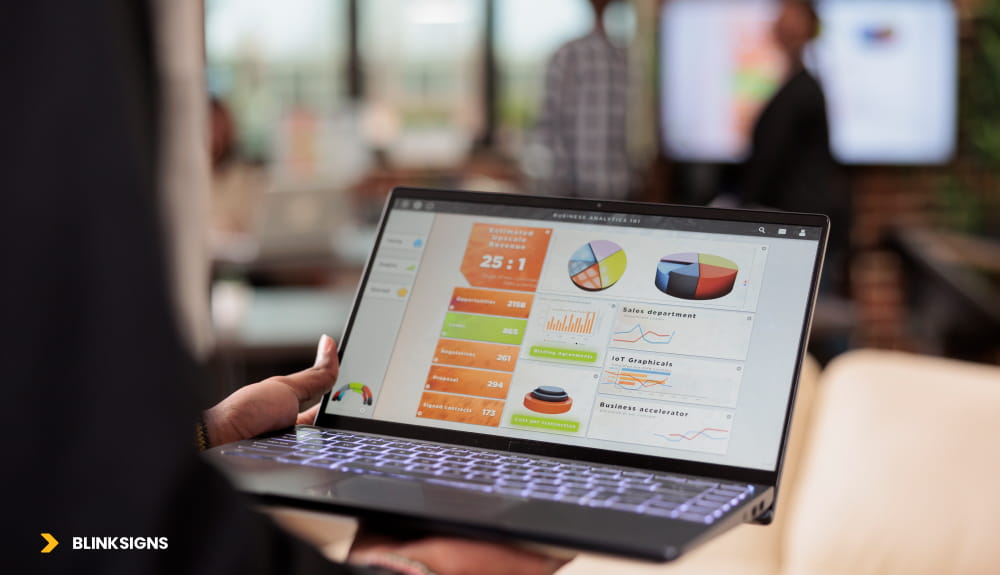
Digital data-connected signage
Data-connected signage is a digital display network that pulls live data from business systems such as Power BI, Salesforce, or ERP platforms and renders it on screens in real time. Unlike static or scheduled content, data-connected signage updates automatically from a source of truth, eliminating manual content changes and keeping frontline teams aligned with current metrics.
Data-connected signage vs standard digital signage
Standard digital signage is designed for scheduled content such as announcements, promotions, and brand messaging.
Data-connected signage is built for operational truth. It connects to business systems and displays the most current performance state.
Where standard signage asks: “What do we want to say?”
Data-connected signage asks: “What do we need teams to see right now?”
What data-connected signage is not
- Not “screen mirroring” a laptop to a TV
- Not “Publish to Web” links exposed to public networks.
- Not a replacement for analytics tools
- Not a single dashboard thrown on a wall without governance.
Data-connected signage is a system. If you treat it like a screen, it fails like a screen.
Why enterprise teams are moving KPIs off laptops and onto walls
When performance visibility depends on a person opening a dashboard, it becomes inconsistent. In practice, that leads to three predictable outcomes:
- Updates get bundled into meetings
- Teams optimize local targets instead of shared outcomes.
- Problems are discovered late, not early.
Data-connected displays change the behavior loop by making performance visible within the environment.
What improves when KPIs are ambient and persistent
- Faster anomaly detection: People notice drift sooner because the metric is always present
- Reduced status meeting load: Shared visibility minimizes the need for recurring “readouts.”
- Cross-team alignment: Sales, Ops, Finance see the same scoreboard, not different versions.
- Frontline self-correction: Teams adjust proactively, not after someone escalates
The goal is not more dashboards. The goal is less ambiguity.
System roles: BI vs CRM vs ERP in a live display network
Most failed deployments start with a blurred assumption: that all dashboards are the same. They are not.
Each system plays a different role in how data should move from source to display.
Power BI: the semantic layer and KPI contract
Power BI is most valuable for signage when it becomes your metric-definition layer.
- Unifies data sources into a consistent model
- Creates reusable KPIs that can be governed
- Enforces Row-Level Security (RLS) for multi-location scaling
- Enables standardized templates that rely on data, not design variation
In enterprise deployments, Power BI often becomes the “single language” layer even when the source systems are different.
Salesforce: revenue motion and service motion
Salesforce dashboards on screens are not just for executives. The best use cases are operational:
- Leaderboards and targets (sales teams, store performance, regions)
- Pipeline coverage and velocity (stage duration, aging, conversion)
- Support and service wallboards (SLA performance, backlog burn-down, escalations)
Salesforce is most significant when it drives behavior, not when it repeats a report.
ERP: operational reality at scale
ERP systems represent “what is actually happening” across production, inventory, procurement, and fulfillment.
ERP signage is where you convert system data into floor action:
- Production output, quality holds, and downtime categories
- Inventory availability and stockout risk
- Order fulfillment status, backlog, exception queues
- Maintenance status and critical asset health
ERP is also where security and performance constraints are strictest. That reality drives your architecture choice.
Three integration architectures (the core differentiator)
Most content in this space stops at “embed the dashboard.” Enterprise deployments require architecture because architecture determines:
- Whether you can pass the IT review
- Whether displays remain stable over time
- Whether you can scale to many locations
- How failures behave, and how quickly you recover
There are three viable integration paths.
Architecture Path 1: Native connector or app
Best for: Power BI when the signage platform supports a secure, authenticated integration.
Why teams choose it:
When it works best:
- You primarily need Power BI dashboards
- Security must avoid public URLs
- The refresh cadence can align with the constraints of the dashboard tool.
Primary risk:
- Connector lock-in and platform-specific limits
Architecture Path 2: Secure render pipeline (headless browser, authenticated screenshot-at-interval)
Best for: Salesforce or any dashboard tool without a secure native connector.
This method behaves like a controlled viewing service:
- A headless browser authenticates to the dashboard
- A rendering service captures frames at intervals.
- Frames are pushed to the signage CMS and displays
Where it wins:
- Works across most dashboard tools
- Avoids public links
- Keeps credentials out of the display device
Where it fails:
- Session timeouts and token renewal issues
- Renderer crashes or stale frames
- Not ideal for sub-30-second truth requirements (NOC/SOC)
Architecture Path 3: API-first display layer (ERP/CRM → middleware → cache → visualization surface)
Best for: ERP integrations and mixed multi-source screens.
This is the highest-control enterprise pattern:
- Systems expose data through APIs, gateways, or controlled endpoints
- Middleware (iPaaS) transforms and standardizes data.
- A caching layer reduces load and stabilizes refresh behavior.
- A visualization surface renders trusted data to screens.
Where it wins:
- Strongest governance and auditability
- Best resilience for multi-source KPI screens
- Enables near-real-time screens without crushing ERP systems
Where it fails:
- Requires IT capability and ongoing maintenance
- Needs data contracts to prevent metric drift
- Must manage rate limits and dependency chains
Architecture decision matrix (use this before you build)
| Integration Method | Best For | Security Posture | Complexity | Reliable Refresh Cadence | Failure Modes | When NOT to Use |
| Native Connector / App | Power BI (when the platform supports it) | SSO / Entra ID supported; no public URLs needed | Low | 15 min (DirectQuery) to 3 hrs (Pro scheduled) | Token expiry, connector lock-in | When you need Salesforce + ERP on the same screen without platform support |
| Secure Render Pipeline | Salesforce, tools without native connectors | Session-based auth; secrets vaulted; no embed token exposed | Medium | 30 sec to 5 min | Session timeout, renderer crash, stale frame | When sub-30 sec accuracy is required |
| API-First Display Layer | ERP and multi-source integration | OAuth service principal; RBAC at gateway; secrets vault; audit trail | High | Sub-5 sec with cache | Gateway dependency, rate limits, contract drift | When IT lacks middleware capability |
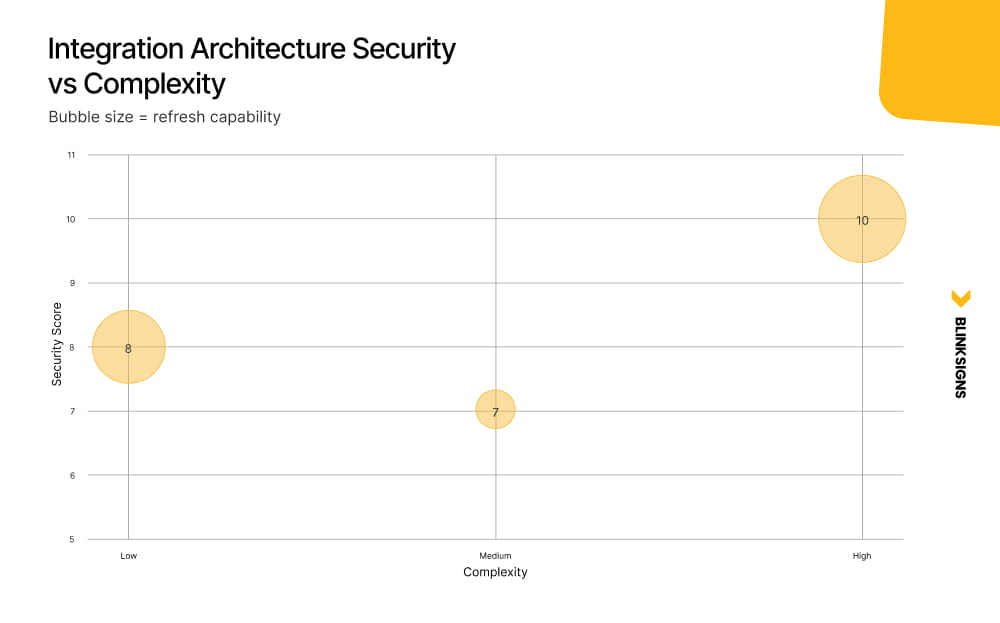
Integration Architecture Security vs Complexity
Power BI on screens, the enterprise way
To display Power BI on digital signage without making it public, use a native connector that authenticates via Microsoft Entra ID and a service principal. This approach keeps reports private, enforces Row-Level Security (RLS), and avoids using “Publish to Web.”
Core components of a secure Power BI signage deployment
Identity boundary: Microsoft Entra ID
Entra ID should be the authentication control plane for your signage integration. This ensures:
- No public URLs
- Conditional access support
- Centralized identity governance
- Revocation and monitoring capability
Display networks are applications. They should authenticate like applications.
Service principal for non-interactive authentication
Avoid shared human accounts.
Use a service principal for the display integration:
- Authenticates as an app
- Has least-privilege access
- Can be rotated or revoked cleanly
- Does not depend on password expiration cycles
This is one of the most common failure points in poorly designed deployments.
Row-Level Security (RLS) for multi-location scaling
If you operate across multiple sites, regions, or departments, RLS allows:
- One report template
- Many screens
- Location-specific data slices
This reduces dashboard duplication and enforces “single metric, single owner” across environments.
Power BI on-premises data gateway for ERP data.
When ERP data lives behind firewalls or in on-prem environments, the gateway:
- Securely bridges internal data to the Power BI Service
- Preserves firewall rules
- Avoids direct external exposure
This becomes critical in manufacturing and logistics contexts.
DirectQuery vs Scheduled Refresh for signage
Choosing incorrectly here leads to performance issues and complaints about stale data.
| Mode | Best For | Risk Profile |
| Scheduled Refresh | Executive dashboards, non-urgent KPIs | Predictable load, limited daily refresh count |
| DirectQuery | Operational dashboards, live floors | Backend strain if poorly modeled |
| Premium-triggered refresh | High-visibility screens | Requires license alignment |
The Power BI refresh frequency depends on the license tier and connection mode. With Pro and Import mode, you can schedule up to 8 refreshes per day. With Premium or PPU, up to 48 refreshes per day, or as low as every 15 minutes using DirectQuery. Custom API pipelines can support more frequent refresh patterns when properly architected.
Salesforce on live displays: from CRM data to visible motion
Salesforce dashboards can be displayed on digital signage using a secure render pipeline, an API-first display layer via middleware, or a platform-native connector. Each method balances security, refresh cadence, and operational complexity differently.
Where Salesforce signage creates measurable impact
- Sales leaderboard screens
- Pipeline coverage monitors
- Service SLA dashboards
- Escalation and backlog visibility
- Campaign performance rollups
The objective is behavior change, not reporting replication.
Salesforce integration decision logic
Secure render pipeline
Use when:
- You need speed for deployment
- You want to avoid building middleware.
- Refresh intervals can tolerate minutes.
Watch for:
- Session expiration
- API rate limits
- Renderer instability
API-first display layer
Use when:
- You need composited screens (Salesforce + ERP + BI)
- You want complete control over caching and throttling.
- You need audit logging and data contracts.
Important constraint: Salesforce API limits apply. Aggressive polling patterns can exhaust daily quotas in Enterprise tiers.
Salesforce permission model considerations
Create a dedicated display service account with:
- Proper object visibility
- Report and dashboard access
- Restricted editing capability
- No personal data exposure in semi-public environments
Never reuse executive or sales user accounts for screens.
ERP dashboards to frontline screens
ERP integration is fundamentally different from BI or CRM integration.
ERP data from SAP, Oracle, or Dynamics 365 reaches factory floor screens through an API-first display layer: the ERP exposes data through APIs or RFC calls, middleware transforms and caches it, and a visualization surface renders the metrics on screen while respecting rate limits and firewall policies.
Why is API-first usually required for ERP
ERP systems are not optimized for constant polling from dozens of screens.
An API-first model allows you to:
- Extract only required fields
- Cache aggressively
- Control refresh cadence centrally.
- Fail gracefully when dependencies are unavailable.
ERP signage use cases that work
Manufacturing:
- OEE and downtime classification
- Production output vs target
- Quality defect categories
- Maintenance backlog
Warehouse:
- Pick rate and backlog
- Dock assignment and ETA
- Exception queue visibility
- Order fulfillment rate
Finance operations:
- AP/AR aging
- Budget variance
- Purchase order approval backlog
Refresh cadence guidance by use case.
Over-refreshing is as damaging as under-refreshing.
Your cadence should match decision urgency.
Refresh Cadence Table
| Use Case | Recommended Interval | Data Source Mode | Risk Notes |
| NOC / SOC Wall | 1 to 15 sec | DirectQuery (Premium) or API cache | High load if the model is not optimized |
| Call Center Wallboard | 30 sec to 2 min | DirectQuery or secure render | Token/session timeout risk |
| Sales Leaderboard | 2 to 5 min | DirectQuery or scheduled refresh | Salesforce API call limits |
| Production Output / OEE | 1 to 5 min | API-first + cache | ERP rate limits vary |
| Inventory Availability | 5 to 15 min | Scheduled or DirectQuery | Add “data as of” timestamp |
| Executive KPI Summary | 15 to 60 min | Scheduled refresh | Governance is more critical than speed |
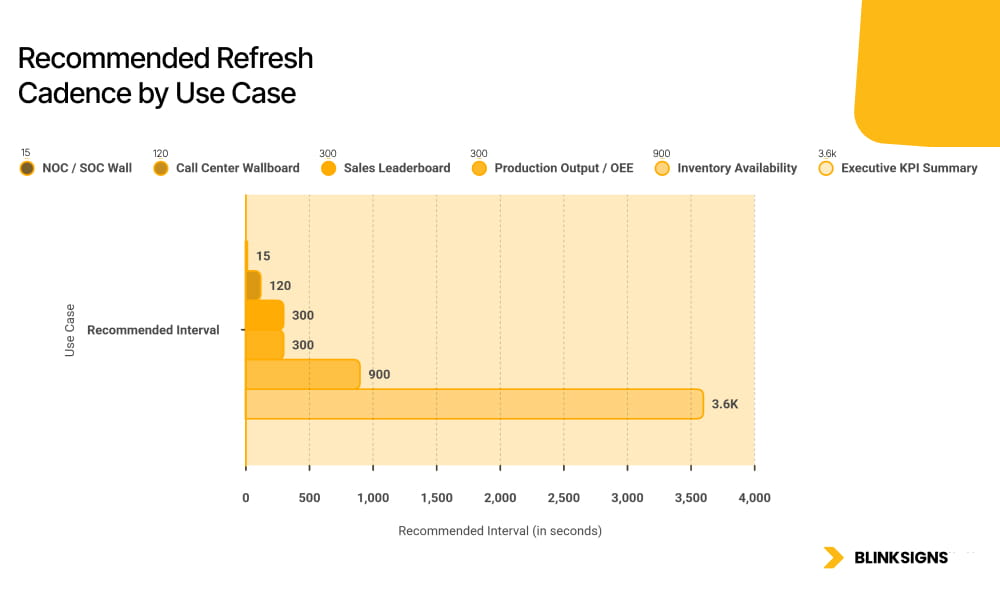
Recommended Refresh Cadence by Use Case
Design principle: freshness vs stability
Ask:
- Does a 30-second delay change decisions?
- Does the backend tolerate high-frequency queries?
- Does the business understand data latency?
In many environments, clearly labeling “Data as of [timestamp]” reduces confusion more effectively than chasing real-time at all costs.
Governance: what IT must see before approving live dashboards on screens
Most signage failures are not technical. They are governance failures.
If dashboards carry authority in the boardroom, they have authority on the wall. That means your display layer must inherit the same security and audit expectations as your reporting layer.
Security architecture fundamentals
Identity and access control
- Microsoft Entra ID as the authentication boundary
- Conditional access aligned to device posture and network requirements
- Role-Based Access Control (RBAC) for template editing, publishing, and data source configuration
- Multi-Factor Authentication (MFA) for administrative changes
Display systems are applications. Applications require identity discipline.
Service principals and least privilege
Every integration should authenticate as a non-interactive identity:
- No shared user credentials
- No password-dependent refresh cycles
- No human login prompts on production screens
Service principals reduce operational fragility and improve auditability.
Secrets management
Credentials and tokens must never live inside:
- Display hardware
- Templates
- Hardcoded scripts
Use a secrets vault class system to:
- Store client secrets and tokens
- Rotate credentials on a defined schedule.
- Revoke access without touching physical screens.
Audit logs and change tracking
Log the following events:
- Authentication and token issuance
- Template publication
- Data source changes
- Role and permission updates
- API configuration modifications
Enterprise signage must be explainable under audit.
Environment separation
Production screens should not be your testing environment.
Maintain:
- Dev environment for integration changes
- Test environment for validation
- Production environment with a controlled promotion path
Executive KPI screens, in particular, require version control and rollback capabilities.
Data Ownership and Contracts — Who owns what gets displayed
Most competitors never address this layer. It is where enterprise deployments either stabilize or fracture.
Governing principle:
A KPI shown on a wall carries the same organizational authority as one shown in a boardroom. Treat display governance with equal rigor.
Core governance model
| Governance Element | Description | Owner |
| KPI Definition Owner | Defines what “revenue,” “OEE,” or “pipeline” means | Finance / RevOps / Ops Lead |
| Source of Truth | ERP for operational data, Salesforce for CRM, BI semantic model for blended metrics | Data Engineering / BI Team |
| Change Control | Approval path for metric or threshold changes | BI Owner + Department Head |
| Versioning & Rollback | Maintain historical display and model versions | BI Platform Admin |
| Single Metric, Single Owner | Each KPI maps to one authoritative source | Data Governance Lead |
Without this structure, “dashboard drift” appears:
- Two screens show different revenue
- Definitions change silently
- Trust erodes
Governance protects credibility.
Industry rollout playbooks
Enterprise data-connected signage scales differently across verticals.
Manufacturing
Primary screens:
- OEE and downtime breakdown
- Production vs target
- Quality holds
- Maintenance alerts
Architecture bias:
- API-first with caching
- Explicit failure fallback states
Design rule:
- Metrics must be visible at a distance
- No scrolling
- Clear target vs actual comparison
Warehouse and logistics
Primary screens:
- Pick rate
- Order backlog
- Dock utilization
- Exception queues
Architecture bias:
- Middleware-driven data
- Refresh every 1 to 5 minutes.
Design rule:
- Zone-specific displays
- Timestamp clarity
- Escalation indicators
Retail
Primary screens:
- Sales by category
- Conversion signals
- Inventory risk
- Staffing coverage
Architecture bias:
- BI semantic model with RLS
- Selective API triggers for operational alerts
Design rule:
- Fast interpretation
- Clean hierarchy
- No dense tables
Corporate operations
Primary screens:
- OKRs and KPIs
- SLA adherence
- Incident status
- Project health
Architecture bias:
- Native BI connector plus selective render integrations
Design rule:
- Executive summary layer
- Controlled-access rooms for sensitive views
Franchise and multi-location networks
Primary screens:
- Location performance
- Compliance metrics
- Sales vs target
- Labor ratio
Architecture bias:
- Standardized template
- RLS-based scaling
Design rule:
- Data-driven localization, not design variation
From dashboard to wall: deployment realities
Software vendors rarely address this layer. Physical deployment determines whether the system survives.
Deployment Reality Checklist
- Viewing distance and font scaling
- Brightness and ambient light calibration
- Screen zoning for persistent vs rotating data
- Uptime expectation and offline fallback
- Device management policy (kiosk mode, auto-restart)
- Multi-location governance templates
- Maintenance lifecycle planning
If your screen fails after hours and nobody notices until morning, your system is not operational.
Common failures and how to prevent them
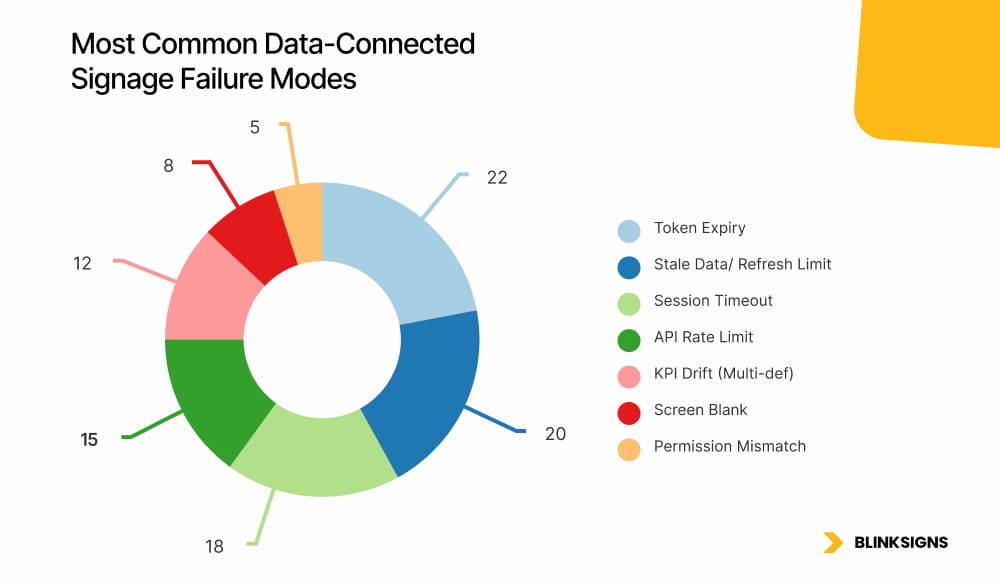
Most Common Data-Connected Signage Failure Modes
| Symptom | Root Cause | Fix |
| Dashboard shows stale data | Refresh limit reached | Upgrade refresh capability or switch critical metrics to DirectQuery |
| Screen displays login prompt | Token expired | Use service principal and automated token renewal |
| ERP metrics lag 10+ minutes | No caching layer | Add Redis cache and define TTL |
| Two screens show different revenue | Multiple KPI definitions | Enforce single metric, single owner |
| The screen blanks after hours | Power management override | Disable OS sleep; implement watchdog process |
| Salesforce data missing | Permission misalignment | Dedicated display service account with correct profile |
Failure prevention is architectural, not reactive.
Frequently Asked Questions
What is the difference between data-connected signage and standard digital signage?
Data-connected signage automatically renders live business metrics from source systems—standard signage schedules static or pre-created content.
How do I display Power BI on screens without Publish to Web?
Use Entra ID authentication and a service principal through a native connector or secure rendering approach to avoid public URLs and enforce RLS.
Can Salesforce dashboards be securely shown on TVs?
Yes. Use secure render pipelines or API-first display layers with vaulted credentials and role-based access control.
How often should a KPI screen refresh?
Refresh cadence should match decision urgency. Operational floors may require updates in minutes or seconds. Executive summaries can be refreshed every 15 to 60 minutes.
How do you prevent sensitive data exposure?
Apply RBAC, Row-Level Security, conditional access, dedicated display accounts, and screen zoning aligned to environment sensitivity.
What architecture is best for ERP screens?
API-first display layers with middleware and caching are typically best because they protect ERP performance while enabling near-real-time visibility.
Final Perspective: Architecture is not enough without operational discipline
Data-connected signage is not a screen project. It is a systems integration initiative that extends business intelligence into the physical environment.
The organizations that succeed:
- Choose architecture based on use case
- Treat identity and governance as first-class.
- Define clear data ownership.
- Align refresh cadence with operational need.
- Design screens for distance, not dashboards
- Plan the deployment lifecycle before hardware goes live.
When those elements align, screens stop being displays. They become operational instruments.