
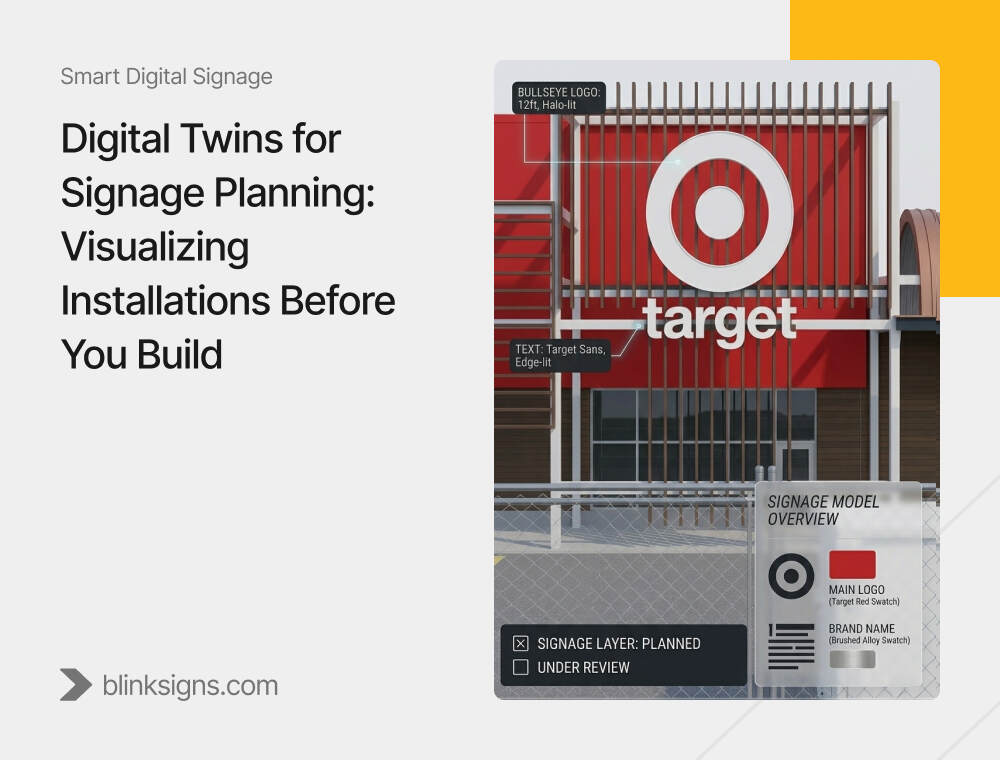
Digital Twins for Signage Planning: Visualizing Installations Before You Build
Why Signage Planning Is Entering a New Phase
Most digital signage networks are still deployed using a reactive model:
Install screens → Test placement → Discover visibility issues → Relocate → Absorb cost → Iterate.
For small deployments, this works. For 50, 200, or 500 screens, it becomes an expensive trial-and-error process.
Common consequences include:
- Screen relocations cost $5,000 to $50,000 per instance
- Permitting delays adding 30 to 60 days to timelines
- Over-provisioned hardware inflates capital budgets by 10 to 20 percent.
- Retail media monetization is underperforming because impression capacity was misjudged.
At the same time, capital approval standards are rising. CFOs increasingly require validated ROI projections before approving signage capex. Programmatic partners require impression forecasts before onboarding inventory. Franchise networks demand standardized rollout models rather than one-off site improvisation.
Digital twins shift signage planning from reactive installation to predictive validation.
They allow operators, integrators, and real estate teams to simulate placement, test content legibility, model traffic patterns, and forecast revenue before hardware is purchased.
Construction and design research from Autodesk reports that projects using digital twin methodologies can see up to a 40 percent reduction in non-budgeted change orders and measurable operational cost improvements. Applied to signage networks, this translates into fewer relocation events, tighter screen counts, and faster deployment cycles.
This guide explains not just what a digital twin is, but how to use it to:
- Optimize screen placement
- Validate compliance before permitting submission.
- Standardize multi-location rollouts
- Forecast retail media and programmatic revenue.
- Reduce rework risk
- Transition from planning the twin to the operational twin
What Is a Digital Twin for Digital Signage?
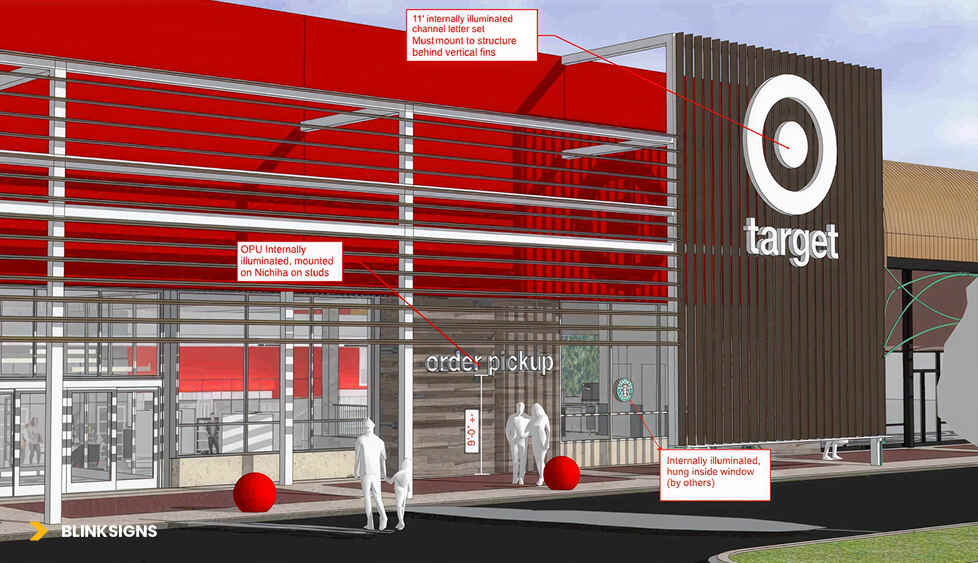
Digital twin for signage
A digital twin for signage is a virtual replica of a physical screen network that combines 3D spatial data, environmental simulation, and content modeling to test placement, visibility, compliance, and performance before hardware installation. Unlike static 3D renderings, digital twins simulate real-world conditions such as foot traffic, lighting, and viewing distance to validate ROI scenarios before capital deployment.
This distinction matters.
Many vendors confuse digital twins with rendering tools. They are not the same.
Digital Twin vs Rendering vs BIM vs AR
| Capability | CAD Drawing | BIM Model | 3D Rendering | Digital Twin | AR Preview |
| Visualizes sign | Yes | Yes | Yes | Yes | Yes |
| Simulates human movement | No | No | No | Yes | Limited |
| Test the content legibility | No | No | Limited | Yes | Limited |
| Models lighting/glare | No | Limited | Visual only | Yes | Limited |
| Validates compliance | Manual | Structural only | No | Yes | No |
| Forecasts impressions/revenue | No | No | No | Yes | No |
| Connects to live systems | No | Limited | No | Yes | No |
CAD and BIM are design tools.
Renderings are approval visuals.
AR is an on-site preview aid.
A digital twin is a simulation and validation environment.
The Two-Phase Digital Twin Model
Digital twins operate in two distinct phases.
1. Planning Twin (Pre-Deployment)
The planning twin exists before installation.
It enables:
- Placement simulation
- Content legibility testing
- Traffic modeling
- Permitting validation
- Revenue forecasting
- Capital justification
It typically concludes when hardware goes live.
2. Operational Twin (Post-Deployment)
The operational twin evolves into a living model of the network.
It can integrate:
- CMS data
- Sensor inputs
- Analytics dashboards
- Programmatic delivery data
- Maintenance alerts
While most 2026 deployments focus on planning twins, leading operators are now extending them into operational twins that function as the single source of truth for distributed screen networks.
This distinction aligns with broader enterprise digital twin frameworks used in construction and infrastructure.
Core Capabilities: What Digital Twins Enable
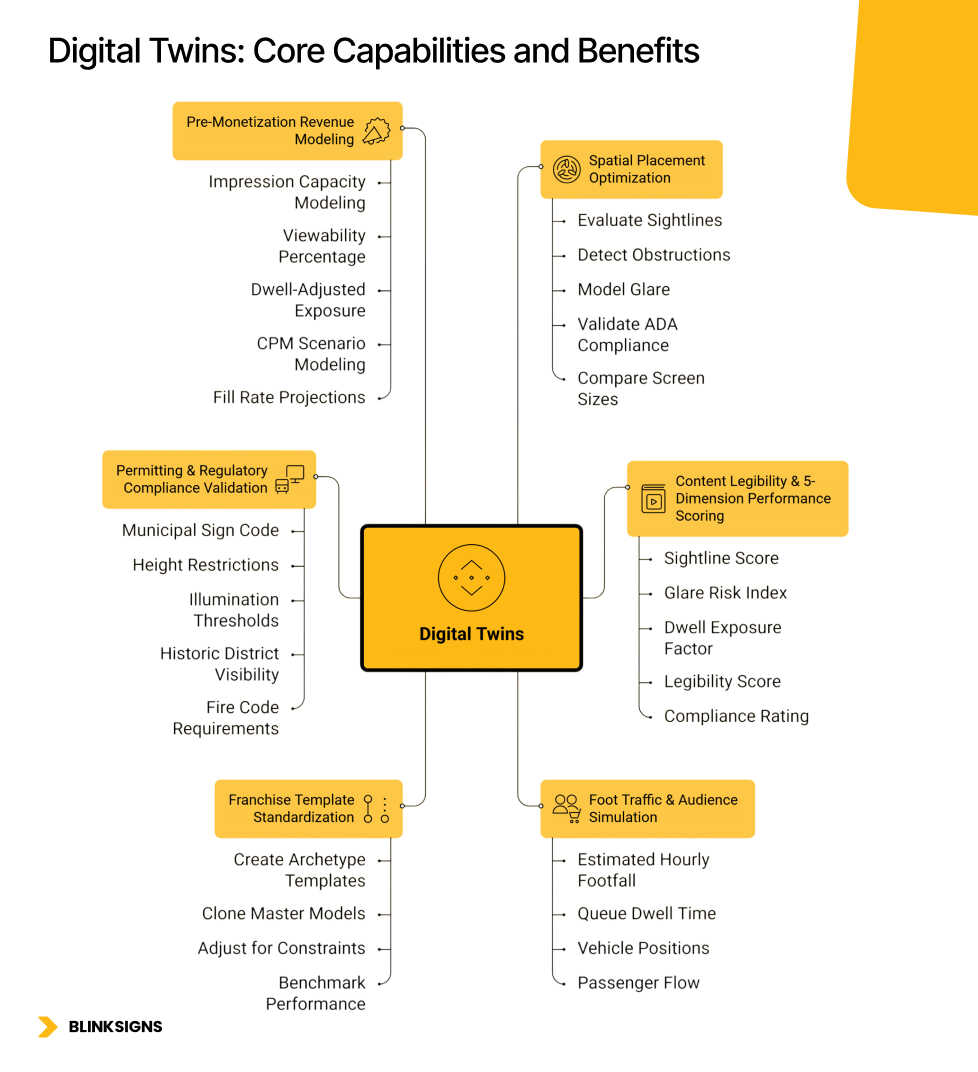
Digital Twins: Core Capabilities and Benefits
A. Spatial Placement Optimization
Digital twins allow teams to test multiple screen positions virtually.
Using spatial data from LiDAR scans, BIM imports, or detailed floor plans, operators can:
- Evaluate sightlines from customer vantage points
- Detect obstructions such as columns or shelving.
- Model glare from windows or artificial lighting
- Validate ADA-compliant mounting heights.
- Compare screen sizes in a real context
Instead of discovering placement issues post-installation, they are identified during simulation.
Operators implementing twin-validated placements commonly report relocation reductions of 60 to 85 percent compared to traditional rollout methods, though results vary by venue type and planning maturity.
B. Content Legibility & 5-Dimension Performance Scoring
Effective digital twins go beyond placement. They test real creativity.
BlinkSigns’ methodology incorporates a five-dimensional performance model:
- Sightline Score – Percentage of passing traffic within the viewable cone
- Glare Risk Index – Ambient light interference probability
- Dwell Exposure Factor – Average viewing duration.
- Legibility Score – Font size and contrast effectiveness at real distances
- Compliance Rating – ADA, code, and lease adherence
This creates a quantifiable validation layer instead of subjective aesthetic judgment.
Rather than asking, “Does this look good?”, teams ask, “Does this score above threshold performance metrics?”
C. Foot Traffic & Audience Simulation
Digital twins can integrate traffic modeling inputs such as:
- Estimated hourly footfall
- Queue dwell time
- Vehicle positions in drive-thru lanes
- Passenger flow in transit environments
This modeling becomes the foundation for impression capacity forecasting.
Beyond operational planning, this same traffic modeling supports pre-monetization revenue forecasting in retail media and programmatic DOOH environments.
For complete programmatic onboarding requirements and SSP integration mechanics, see Programmatic DOOH Explained: A Complete Guide for Brands, Franchises, and Operators.
D. Franchise Template Standardization
For multi-location networks, digital twins function as standardization engines.
Instead of engineering each site independently, operators can:
- Create archetype templates for store formats
- Clone master models for new locations
- Adjust for site-specific constraints.
- Benchmark actual vs modeled performance
A 300-location QSR network that builds three archetype models (urban, suburban, highway) may reduce site-specific engineering hours by 60% or more and significantly compress rollout timelines compared to a fully bespoke deployment.
This is not just cost avoidance. It is operational scalability.
E. Permitting & Regulatory Compliance Validation
Permitting delays are one of the most underestimated risks in signage deployment.
Digital twins allow teams to simulate:
- Municipal sign code size limits
- Height restrictions and setbacks
- Illumination thresholds
- Historic district visibility constraints
- Fire code and emergency signage requirements
- Landlord fascia rules
Permitting rejection cycles can cost $5,000 to $25,000 per revision and add weeks to project timelines.
Operators using compliance validation in digital twins often achieve materially higher first-submission approval rates than in traditional submission workflows, though outcomes vary by jurisdiction.
For large transit or multi-jurisdiction rollouts, this compliance modeling alone can justify the twin investment.
F. Pre-Monetization Revenue Modeling
Digital twins are increasingly used as validation tools for retail media.
Capabilities include:
- Impression capacity modeling by zone
- Viewability percentage simulation
- Dwell-adjusted exposure forecasting
- CPM scenario modeling
- Fill rate projections at 30, 50, or 70 percent assumptions.
- Payback period calculation
Instead of pitching SSP partners with estimated impression ranges, operators can provide validated simulation outputs.
This materially strengthens private marketplace negotiations and the credibility of retail media networks.
For structured in-store monetization strategies, see Retail Media Networks for Signage: Turning Your Displays Into Revenue-Generating Ad Inventory.
The 6-Layer Digital Twin Architecture Stack
Effective signage twins are built in layers.
Layer 1: Spatial Data Foundation
LiDAR scans, BIM models, point clouds, and detailed floor plans.
Layer 2: Screen Hardware Modeling
Display dimensions, resolution, brightness, mounting requirements, and power routing.
Layer 3: Environmental Simulation
Lighting conditions, traffic flow, obstructions, and reflective surfaces.
Layer 4: Content Testing & Optimization
Legibility modeling, dwell-based scoring, message testing.
Layer 5: Revenue & Performance Modeling
Impression forecasts, CPM scenarios, retail media projections.
Layer 6: Operational Integration
CMS connectivity, analytics dashboards, programmatic integration, and maintenance planning.
Basic implementations may reach Layer 3.
Mature networks extend through Layer 6 to build operational twins.
Vertical Use Case Example: QSR Drive-Thru Optimization
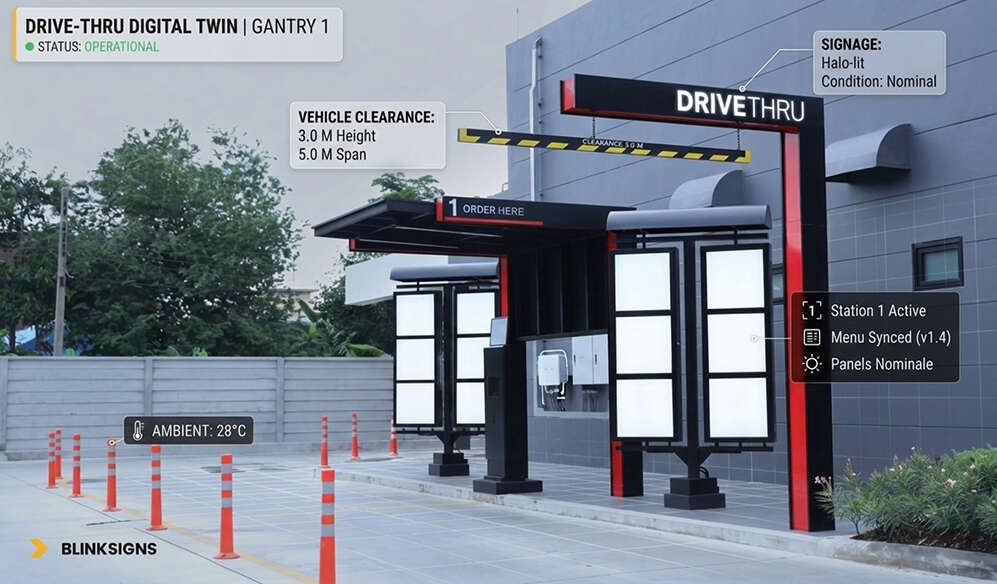
Vertical Use Case Example of digital twin for signage
Scenario: A 200-location QSR chain redesigning its drive-thru pre-menu and menu board placements.
Challenge:
Vehicle height variation, glare from sunlight, and inconsistencies in order accuracy.
Digital Twin Application:
- Modeled sedan, SUV, and truck viewing angles
- Simulated daylight glare at different hours
- Tested menu font size and contrast
- Evaluated queue dwell time
Outcome:
Validated improved visibility and projected measurable gains in order clarity before installation. Avoided what would have been an estimated $500,000 to $750,000 in potential relocation costs across the full rollout based on standard rework benchmarks.
High-performing retail media networks and programmatic DOOH deployments begin with validated placement.
Additional Vertical Use Cases
1. Retail Chain: End-Cap & Aisle Screen Optimization
Scenario: A 150-store retail chain planning end-cap digital screens to support category promotions and future retail media monetization.
Challenge:
Maximize visibility without obstructing merchandise, violating ADA clearances, or underdelivering on impression volume.
Digital Twin Application:
- Modeled three placement configurations per store format
- Simulated shopper flow and dwell time by aisle
- Tested creative legibility from 8 to 15 feet
- Modeled viewability percentages by placement angle
- Forecasted impression capacity for SSP onboarding
Outcome:
Twin-validated placements reduced post-install adjustments by approximately 70-80% compared to historical rollout benchmarks. Impression capacity projections were materially more accurate than prior deployments, strengthening retail media pitch decks.
2. Corporate Campus: Lobby & Wayfinding Integration
Scenario: A new multi-building headquarters integrating brand storytelling, visitor wayfinding, and operational dashboards.
Challenge:
Avoid over-installing screens, prevent redundancy, and ensure compliance with internal design standards.
Digital Twin Application:
- Imported BIM models from the architectural team
- Placed signage during the design phase rather than post-construction
- Conducted virtual walkthrough testing
- Identified redundant placements
- Modeled ambient lighting impact
Outcome:
Eliminated a double-digit percentage of planned screens before procurement. This avoided costly post-occupancy adjustments and reduced the deployment timeline compared to traditional reactive installation methods.
3. Airport Terminal: Advertising Inventory Planning
Scenario: Terminal renovation introducing new digital advertising inventory.
Challenge:
Maximize impression yield without disrupting passenger movement or violating aviation authority guidelines.
Digital Twin Application:
- Modeled passenger flow from security to gate
- Simulated dwell time at retail clusters
- Calculated viewability-adjusted impression projections
- Validated line-of-sight constraints
Outcome:
Enabled accurate revenue forecasting before capital spend. Supported early anchor advertiser commitments based on validated inventory projections rather than speculative estimates.
4. Transit Shelter Network: Multi-Jurisdiction Compliance
Scenario: 500-shelter digital screen deployment across 12 municipalities.
Challenge:
Varying zoning rules, illumination standards, and height restrictions.
Digital Twin Application:
- Modeled each jurisdiction’s code requirements
- Simulated brightness levels against local ordinances
- Validated setback compliance
- Generated permit-ready documentation
Outcome:
First-submission approval rates improved significantly compared to prior manual processes. Avoided multiple revision cycles that typically cost thousands per site and add weeks of delay.
ROI Framework: Quantifying Digital Twin Value
Digital twin ROI falls into three categories:
1. Cost Avoidance
Typical ranges observed across signage and construction-aligned deployments:
- Eliminated screen relocations: $5,000 to $50,000 per instance
- Reduced screen count: 10 to 20 percent fewer units required
- Shorter installation timeline: 20 to 40 percent reduction
- Reduced pre-install site visits: 50 to 70 percent decrease
Actual results vary depending on venue complexity, baseline planning maturity, and regulatory environment.
Construction industry data indicates that digital twin methodologies can reduce non-budgeted changes by up to 40 percent. While signage deployments differ from complete construction projects, similar cost dynamics apply to rework and scope creep.
2. Performance Improvement
Operators implementing twin-validated placements commonly report:
- Improved viewability scores
- Higher dwell-adjusted exposure
- Fewer glare-related visibility failures
- Better alignment between modeled and delivered impression volumes
Improvements in the 15-30% range are often cited when comparing validated placements to trial-and-error deployments, though performance depends heavily on content strategy and environment.
3. Revenue Optimization
For retail media and programmatic environments, twins enable:
- Impression forecasting before SSP onboarding
- CPM scenario modeling
- Fill rate simulations at 30, 50, and 70 percent assumptions.
- Payback period validation
Instead of estimating revenue potential after installation, operators can model it before procurement.
Procurement & RFP Value
Digital twins also strengthen vendor procurement.
Twin-generated outputs can include:
- Bill of materials validation
- Installation documentation
- Compliance reports
- Zone-by-zone placement scoring
- Revenue modeling summaries
This shifts RFP evaluation from vendor promises to data-backed comparison.
Implementation Workflow: 7-Step Deployment Model
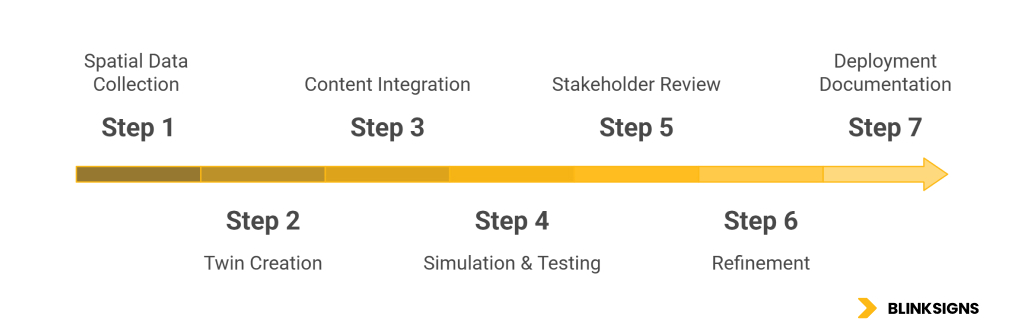
Digital Twin Project Deployment Timeline
A typical digital twin project spans 8 to 15 weeks.
Step 1: Spatial Data Collection (1–2 Weeks)
LiDAR scanning or BIM import
Capture environmental lighting data.
Identify the candidate screen locations.
Step 2: Twin Creation (2–3 Weeks)
Model hardware accurately
Build environmental conditions
Integrate traffic assumptions
Step 3: Content Integration (1 Week)
Upload real creative
Configure brightness and resolution
Apply legibility scoring parameters
Step 4: Simulation & Testing (2–4 Weeks)
Test placement variations
Model dwell and exposure
Validate compliance and permitting criteria.
Step 5: Stakeholder Review (1–2 Weeks)
Generate visual outputs
Present ROI modeling
Iterate placement decisions
Step 6: Refinement (1–2 Weeks)
Optimize based on feedback
Lock final design
Step 7: Deployment Documentation (1 Week)
Generate install specifications
Produce compliance-ready permit packages.
Export hardware and integration requirements
Vendor Landscape & Selection Criteria
Digital twin vendors fall into three categories:
1. Full-Service Integrators
End-to-end: scanning, modeling, compliance, installation.
Best for large networks and franchises.
2. Software Platforms
BIM-based or game-engine-based tools.
Best for technically capable in-house teams.
3. Specialized Visualization Firms
Project-based modeling for stakeholder presentations.
Best for high-stakes approvals.
| Criterion | Evaluate | Why It Matters |
| Signage experience | Prior DOOH or network deployments | Signage constraints differ from general construction |
| Data integration | Ability to ingest BIM, LiDAR, and traffic data | Determines simulation accuracy |
| Compliance modeling | Permitting validation capabilities | Reduces rejection cycles |
| Revenue modeling | Impression forecasting functionality | Supports retail media and SSP onboarding |
| Operational extension | Ability to evolve into an operational twin | Future-proof investment |
Common Pitfalls
Pitfall 1: Visualization Without Data
Mitigation: Require measurable scoring and traffic modeling.
Pitfall 2: Over-Engineering
Mitigation: Right-size twin fidelity to project scope.
Pitfall 3: Ignoring Post-Deployment Continuity
Mitigation: Retain twin for future expansions and recalibration.
Pitfall 4: Excluding Stakeholders
Mitigation: Structured review cadence with operations, compliance, and finance.
Pitfall 5: Testing Placeholder Content
Mitigation: Always simulate tangible creative assets.
The Evolution of Digital Twins: 2026–2028
Between 2026 and 2028, digital twins for signage are likely to transition from optional planning tools to operational infrastructure for large networks.
Three drivers:
- Rising capital approval standards
- Retail media monetization requires validated impression forecasts.
- Maturing integration between CMS, analytics, and programmatic platforms
Planning twins will increasingly evolve into operational twins connected to live systems.
For predictive optimization capabilities, see Predictive AI for Digital Signage: How Autonomous Content Engines Will Reshape 2026.
FAQ
What is a digital twin for digital signage?
A virtual model that simulates screen placement, visibility, compliance, and performance before hardware installation.
Is a digital twin required for large rollouts?
Not mandatory, but highly recommended for deployments exceeding 50 screens due to rework risk and capital exposure.
What is the difference between BIM and a digital twin?
BIM focuses on structural design. A digital twin adds behavioral simulation, performance modeling, and revenue forecasting.
Can digital twins reduce installation rework?
Yes. Operators commonly report substantial reductions in relocation events compared to reactive deployment models.
How accurate are digital twin simulations?
Accuracy depends on input data quality. When built from measured spatial and traffic data, simulations can closely approximate real-world performance, though there is always some variance.
How much does a signage digital twin cost?
Costs vary widely based on scale and fidelity. Single-site planning models may start in the tens of thousands, while multi-location networks require larger investment.
Can digital twins support retail media forecasting?
Yes. Twins can simulate impression capacity and CPM scenarios before SSP onboarding.
Do I need LiDAR?
LiDAR improves accuracy but is not mandatory for all projects. High-quality BIM or floor plan data may suffice for simpler deployments.
Validate Before You Install
If you are planning a multi-location rollout, retail media deployment, or franchise standardization initiative, the question is no longer whether screens will perform — it is whether you can validate performance before committing capital.
BlinkSigns provides digital twin planning services for operators deploying 50+ screens, including:
- Spatial data capture and full-network modeling
- Permitting and compliance validation workflows
- Franchise archetype template creation
- Impression forecasting for retail media and programmatic DOOH
- CFO-ready ROI and capital approval documentation
Schedule a Digital Twin Feasibility Assessment to evaluate whether pre-deployment simulation can reduce your capital risk and accelerate rollout timelines.