
Digital Wayfinding Systems: Smart Navigation for Modern Spaces
Why Smart Navigation Finally Became a Priority
Visitors don’t remember your floor plan.
They remember how it felt to find (or not see) where they needed to go.
A patient is running late because they can’t locate Radiology.
A client wanders between floors in search of a meeting room.
A family circles a parking garage and three lobbies before they reach the right clinic.
Every one of those moments has a cost:
- Frustrated visitors and staff
- Missed or delayed appointments
- Front-desk teams are spending hours giving the exact directions
- Negative reviews that quietly erode trust
Static wayfinding signage can only go so far in multi-building campuses, hospitals, offices, and mixed-use spaces where people, tenants, and layouts constantly change. Visitors expect straight forward, simple, smartphone-friendly navigation at every touchpoint – from the main entrance to the exact room or department.
That’s where digital wayfinding systems come in.
This guide is not just a definition article. It’s a decision manual for facilities, IT, and operations leaders who need to:
- Understand the main technologies
- Compare long-term costs
- Evaluate vendors with confidence.
- Plan a realistic rollout.
- Build a solid ROI case.
- Combine physical signage and digital navigation into a single, consistent system.
As a signage partner that already designs and installs physical wayfinding and ADA-compliant systems, BlinkSigns approaches digital wayfinding as part of a hybrid ecosystem – not a separate “tech project.” This guide will show you how to do the same.
5 Mistakes That Derail Digital Wayfinding Projects
Before we dive into definitions and frameworks, it’s helpful to understand where projects often go wrong. Most stalled or underutilized digital wayfinding systems exhibit similar patterns.
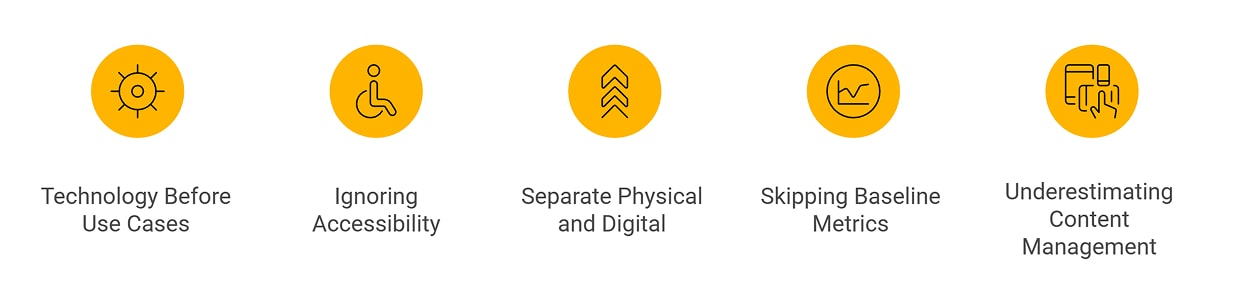
Mistakes That Derail Digital Wayfinding Projects
1. Choosing Technology Before Defining Use Cases
Teams often start with questions like:
“Should we use beacons or Wi-Fi?”
“Do we need AR?”
Those are the wrong first questions.
The correct starting point is:
- Who are we guiding? (patients, visitors, students, staff, shoppers)
- What are their most common journeys?
- Where do they get stuck today?
- What absolutely must improve in the next 12–24 months?
Technology should serve specific journeys (e.g., “From parking to Cardiology in under 5 minutes”), not the other way around. Choosing a tech stack without clear use cases can lead to overspending, underutilization, and features that nobody really needs.
2. Ignoring Accessibility Until Late in the Project
Accessibility is often treated as a “phase two” item:
- Kiosks installed at the wrong height
- No accessible routing (stairs everywhere, few clear elevator paths)
- Interfaces that are impossible to use with a screen reader
- Tiny fonts and low contrast on busy, bright screens
Once the hardware is on the wall and the software is deployed, fixing accessibility becomes expensive and sometimes structurally impossible.
Accessibility needs to shape:
- Routing logic (step-free paths, ramps, elevators)
- Interface design (contrast, language, text size, audio)
- Physical placement (reach ranges, angles, clearances)
Handled early, accessibility makes navigation better for everyone – not just visitors with disabilities.
3. Treating Digital and Physical as Separate Projects
One vendor handles physical signs.
Another handles digital screens and software.
No one owns the whole experience.
The result:
- Physical signs point to outdated department names
- Digital maps use different terminology from wall signs.
- Color-coding on screens doesn’t match zone colors on physical signs.
- Visitors get inconsistent directions depending on where they look.
People don’t think in “channels.” They just want a clear path. When physical and digital wayfinding evolve separately, confusion grows.
A hybrid strategy demands one overall wayfinding plan that synchronizes:
- Physical directional signs
- ADA and room signs
- Floor graphics and overhead markers
- Digital directories, kiosks, and mobile maps
4. Skipping Baseline Metrics and Pilot Testing
Teams implement digital wayfinding and then say:
“It feels better. People seem less lost.”
That is not a metric.
Without a baseline, it’s impossible to:
- Prove ROI to leadership
- Fine-tune routes and signage
- Decide whether to expand to additional buildings.
You need simple baseline data before launch, such as:
- Average time from the entrance to key destinations
- Number of direction requests per day at front desks
- Missed or late appointments due to navigation issues
- Annual print and map reprint costs
- Satisfaction scores around “ease of finding your way.”
A small pilot lets you test accuracy, UX, and adoption, then adjust before scaling across a campus.
5. Underestimating Ongoing Content Management
Digital wayfinding is not a “set it and forget it” project.
Spaces change:
- Departments move floors
- Tenants come and go
- Rooms get renumbered
- Corridors close for renovation
- New buildings come online.
If no one clearly owns updates, your system decays:
- Wrong room names and locations
- Routes through areas that no longer exist
- Kiosks that contradict printed signs
Sustainable digital wayfinding depends on:
- A clear content ownership model
- Simple update workflows
- Routine audits for routes, labels, and POIs
Later in this guide, we’ll outline a content governance model you can apply.
What Is a Digital Wayfinding System?
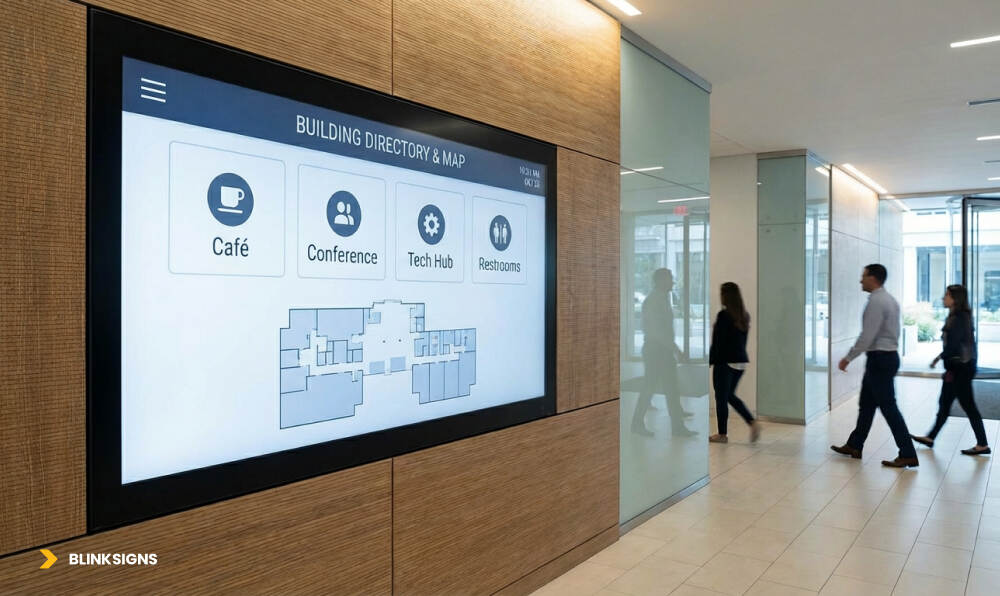
Digital Wayfinding Screen
At its core, a digital wayfinding system helps people navigate complex indoor or mixed indoor–outdoor spaces using interactive, real-time guidance rather than relying solely on static maps and signs.
Think of it as an ecosystem that combines:
- Digital maps: Floor plans and site maps built for screens
- Positioning: Technology that understands where the user is (or where they start)
- Interfaces: Kiosks, digital directories, and mobile experiences
- Routing logic: How the system chooses the path from A to B
- Content: Names, categories, photos, and metadata for destinations
- Analytics: Data on where people go, where they get stuck, and what they search for
Instead of handing someone a printed map or pointing down a corridor, a digital wayfinding system can:
- Show “You are here” on an interactive map
- Let them search “Cardiology” or “Room 3B.”
- Present the best route for their situation (e.g., accessible, fastest, least crowded)
- Hand off directions from a kiosk to their smartphone via QR code.
Digital wayfinding doesn’t replace physical signs; it enhances and extends them, especially in large, complex environments.
Why Modern Spaces Are Moving to a Digital & Hybrid Wayfinding
Visitor Experience and Stress Reduction
For many people, visiting a hospital, government office, or a large corporate campus is already a stressful experience. Getting lost amplifies that stress.
Digital wayfinding can:
- Shorten the time it takes to find a destination
- Reduce awkward “Sorry, can you tell me where…?” conversations.
- Allow visitors to self-navigate on their phones if they prefer to maintain their privacy.
- Provide directions in multiple languages.
That calmer experience translates into better reviews, better satisfaction scores, and fewer complaints across the board.
Staff Time and Operational Efficiency
Every time someone at the front desk steps away from more valuable work to walk a visitor to another floor, you’re paying for navigation – not expertise.
Digital wayfinding helps:
- Front-line staff redirect visitors to kiosks or mobile maps
- Reduce repeat questions for the same destinations.
- Let internal staff find meeting rooms, hot desks, or shared spaces faster.
- Provide real-time updates on closures so staff aren’t giving outdated directions.
Over the course of a year, saved minutes turn into saved hours, and saved hours become meaningful operational efficiency.
Real-Time Updates vs Printed Maps
Static maps go out of date as soon as:
- A tenant moves
- A department changes name
- A corridor is closed for construction.
Digital wayfinding lets you:
- Hide closed routes instantly
- Add new destinations without reprinting everything.
- Update department names and categories across all interfaces in one place
- Push alerts about elevator outages, temporary relocations, or event changes.
Physical signs still play a vital role, but digital platforms give you the agility to keep information accurate and current.
Brand Perception and Workplace Expectations
Modern workplaces, campuses, and public spaces are judged not only on their appearance but also on how easy they are to use.
An environment where:
- Signs are consistent
- Kiosks feel intuitive
- Mobile directions are available on demand.
…communicates that the organization is organized, considerate, and future-focused. For employees and tenants, that experience becomes a key reason they choose to stay.
Inside a Digital Wayfinding Ecosystem
Digital Wayfinding Ecosystem
Before diving into technologies and frameworks, it is helpful to view the system as a layered ecosystem.
Hardware Layer – Kiosks, Displays, Beacons, Sensors
This is everything visitors can touch or see in the physical world:
- Interactive kiosks in lobbies, near elevators, and key decision points
- Digital directories that list departments, tenants, or services
- Large-format displays for maps and directional prompts.
- Bluetooth beacons or other devices that support indoor positioning
- Occupancy sensors that feed real-time data into routes and suggestions
Placement, visibility, and ergonomics are just as important here as they are in traditional signage.
Software Layer – Positioning, Maps, Content, Integrations
Behind the screens, software pulls everything together:
- Digital mapping engine that stores and renders floors, paths, and zones
- Positioning engine that interprets Wi-Fi, BLE, or other signals
- Routing logic that calculates the best path based on rules
- Content management system (CMS) for managing POIs, labels, and categories
- APIs and integrations with systems like BMS, booking, EHR, and emergency alerts
This layer determines how quickly you can update content, add integrations, and scale across buildings or sites.
Experience Layer – Interface, Branding, Accessibility
This is what people interact with:
- Kiosk interfaces with buttons, search bars, filters, and maps
- Mobile views that prioritize clarity and larger touch targets
- Search flows that handle misspellings and partial names.
- Visual hierarchy that makes key destinations stand out
- Accessibility features like high-contrast modes, audio guidance, and screen reader support
- Consistent use of colors, icons, and naming to align with physical signage
Later in the guide, we’ll go deeper into UX principles and how physical wayfinding design translates into digital experiences.
Choosing the Right Positioning Technology
Not every building needs the same level of precision or the same infrastructure. One of the most significant decisions you’ll make is how the system determines the location of users.
The main approaches you’ll see are:
- Bluetooth Low Energy (BLE) beacons
- Wi-Fi-based positioning
- Hardware-free positioning (using sensors/vision in the user’s device)
- Ultra-Wideband (UWB)
- Augmented Reality (AR) overlays are layered on any of the above.
The 5 Main Approaches at a Glance
At a high level:
- BLE beacons
- Small battery-powered devices placed in ceilings/walls
- Suitable for 1–5 meter accuracy
- Suited to hospitals, retail, museums, and airports where route precision matters
- Small battery-powered devices placed in ceilings/walls
- Wi-Fi positioning
- Uses existing Wi-Fi access points
- Typically 3–15 meter accuracy
- Works well for office buildings and campuses with strong Wi-Fi, where installing new hardware is difficult
- Uses existing Wi-Fi access points
- Hardware-free positioning
- Uses sensors in the phone (gyroscope, accelerometer, magnetometer), sometimes with visual mapping
- Avoids additional hardware but relies heavily on accurate digital maps and calibration
- Attractive for budget-conscious or infrastructure-constrained sites
- Uses sensors in the phone (gyroscope, accelerometer, magnetometer), sometimes with visual mapping
- Ultra-Wideband (UWB)
- Provides very high accuracy (down to sub-meter)
- Better suited for asset tracking and sensitive industrial environments than standard visitor routing
- Higher complexity and investment level
- Provides very high accuracy (down to sub-meter)
- AR overlays
- Visual arrows and prompts overlaid on the real world through a camera view.
- Depends on an underlying positioning method (e.g., BLE or Wi-Fi)
- Useful where you want a more immersive, visually guided experience
- Visual arrows and prompts overlaid on the real world through a camera view.
Matching Technology to Your Use Cases
Choosing the “best” technology starts with your accuracy needs, building type, and budget range:
- If you need visitors to follow exact routes in complex corridors (e.g., hospitals, airports), BLE beacons or a well-executed hardware-free approach can work well.
- If you already have a dense Wi-Fi network and do not want to install new hardware, Wi-Fi-based positioning is desirable, especially in corporate or educational environments.
- If your focus is high-value asset tracking or specialized industrial flows, UWB may justify the investment.
- If you want standout visual guidance and your audience is comfortable with camera-based navigation, AR overlays can sit on top of whichever core positioning method you choose.
Understanding Total Cost of Ownership (TCO) Over 5 Years
When teams compare digital wayfinding solutions, they often focus on year-one costs — the software license, kiosk hardware, and possibly some installation. That’s only half the story.
The real differentiator is 5-year Total Cost of Ownership (TCO), which includes:
- Mapping and content creation
- Software renewal
- Hardware upkeep (battery replacements, kiosk maintenance)
- Integration costs
- CMS upkeep
- Map updates due to renovations/tenant changes
A system that’s “cheap” upfront may become expensive to maintain, while a system with a higher initial investment may be more stable and cost-effective long-term.
Comparing the Four Most Common Approaches
Instead of complex numbers (BlinkSigns avoids publishing specific pricing), use relative cost tiers:
| Approach | Year-1 Cost | 5-Year TCO | Maintenance Complexity | Infrastructure Required | Best Fit |
| Kiosk + QR Combining Static & Digital | $ | $$ | Low | Power + network | Office lobbies, retail, simple layouts |
| Wi-Fi Positioning | $$ | $$ | Low–Medium | Existing Wi-Fi | Corporate campuses, universities |
| Hardware-Free (Sensor Fusion / Visual) | $$ | $$$ | Medium | Mapping + calibration | Large facilities, budget-conscious deployments |
| Bluetooth Beacons (BLE) | $$–$$$ | $$$ | Medium–High | Beacon network | Hospitals, airports, complex multi-floor routing |
| UWB (Ultra-Wideband) | $$$$ | $$$$ | High | Anchors + tags | Industrial, high-precision tracking |
What Impacts 5-Year TCO Most?
- Frequency of building updates (renovations, expansions)
- Kiosk placement (high-traffic kiosks require more maintenance)
- Whether you need full mobile turn-by-turn or just entry-point navigation
- Integration depth (EHR, space booking, emergency alerts)
- Accuracy requirements (higher accuracy = more infrastructure)

Relative 5 Years Total Cost of Ownership by Approach
Takeaway:
Choosing technology without understanding long-term cost drivers often leads to systems that are hard to sustain or scale.
Evaluating Digital Wayfinding Vendors: What to Ask & Score
Most vendors sell features. Few show how their solution fits into a complex facility with real operational dependencies.
This vendor-neutral framework enables you to evaluate providers objectively, without relying on marketing claims.
The 10 Key Selection Criteria (Weighted Scorecard)
Score each vendor 1–5 across the factors below:
| Criterion | Weight | What It Means in Practice |
| 1. Positioning Technology & Accuracy | 20% | Do they support BLE, Wi-Fi, and hardware-free? What accuracy do they guarantee — and how do they measure it? |
| 2. Integration Capabilities | 15% | Open APIs? Pre-built connectors? Can they integrate with BMS, EHR, booking systems, and emergency systems? |
| 3. Platform Features | 15% | Kiosk UI, mobile navigation, QR code handoff, multilingual support, analytics, and promotional routing. |
| 4. Analytics & Reporting Depth | 10% | Heatmaps, foot traffic flows, engagement metrics, and route performance. |
| 5. Customization & Branding | 10% | Can layouts, colors, icons, and styles be fully customized to match your brand identity? |
| 6. Content Management Ease | 10% | Can non-technical staff easily update rooms, closures, and POIs? |
| 7. Cost Structure Transparency | 10% | Are fees clear? Any per-user or per-location pricing? Hidden costs? |
| 8. Implementation Support & Training | 5% | Map creation support? Training included? Guided rollout? |
| 9. Reliability & Uptime | 3% | SLA commitments? Offline fallback? Redundancy? |
| 10. References & Proven Deployments | 2% | Do they have comparable facility types or scale? |
Vendor Red Flags
- “Accuracy varies” without a measurement method
- No open API access
- Locked into proprietary map formats
- Extra fees for exporting analytics
- Vague pricing, per-user charges, or unclear licensing tiers
Vendor Green Flags
- API-first architecture
- Clear accuracy benchmarks
- Robust CMS with role-based access
- Proven integrations in similar industries
- Accessible, intuitive kiosk + mobile UX
Use this scorecard to shortlist 3–5 vendors before requesting demos or pilot proposals.
Building Your Digital Wayfinding Tech Stack & Integrations
A digital wayfinding system becomes exponentially more valuable when it connects with the systems your facility already relies on.
Here are the core integration layers that unlock the most value:
1. Building Management Systems (BMS)
Integrations can automate real-time “status-aware” routing:
- Elevator outages
- Stairwell closures
- Fire alarm states
- Restricted areas
This prevents routing visitors into blocked paths and improves life-safety compliance.
2. Space Booking & Room Reservation Systems
Examples:
- Office 365 / Google Workspace
- Workplace booking systems
- Desk reservations
Users can navigate to:
- They’ve booked a meeting room
- The nearest available workspace
- Hot desks or shared areas
Real-time availability and routing dramatically reduce the time lost searching for rooms.
3. Healthcare EHR & Appointment Systems
For hospitals and clinics:
Integrations with Epic, Cerner, Athena, or MyChart can:
- Pull appointment location
- Auto-route patients based on check-in
- Reduce late arrivals and missed appointments.
This is one of the highest-impact integrations in healthcare facilities.
4. Emergency Alert Systems
During emergencies, the wayfinding interface should shift into evacuation mode:
- Highlight nearest safe exits
- Avoid hazard areas
- Adjust for elevator shutdowns.
- Push real-time notifications
This is where digital complements (not replaces) physical emergency signs.
5. Retail/POS Inventory Systems
Useful for malls, supermarkets, or big-box retail:
- “Find a product in-store.”
- Promotions mapped to specific aisles
- In-store routing from entrance to product to checkout
This boosts sales and improves customer flow.
6. IoT Sensors & Workplace Analytics
Sensors add real-time intelligence:
- Occupancy-based routing
- “Find a quiet area to work.”
- Displaying the least congested pathways
- Predictive flow modeling
This turns wayfinding into a proactive optimization tool.
How to Implement Digital Wayfinding in 6 Phases
A successful rollout is not linear — it’s phased and iterative.
Here’s the field-tested framework BlinkSigns uses when guiding clients.

Digital Wayfinding – 6 Phase Implement Timeline
Phase 1: Discovery & Requirements (Weeks 1–4)
You identify:
- Current wayfinding pain points
- Stakeholder needs (IT, facilities, front desk, accessibility teams)
- Integration requirements
- Accuracy expectations
- Technology approach
- Preliminary budget & timeline
Outputs: Requirements brief, integration plan, and technology selection.
Phase 2: Design & Pilot Planning (Weeks 5–8)
Includes:
- Digital map creation
- POI taxonomy
- Accessibility routes
- Kiosk + mobile UI design
- Pilot location selection
- User testing protocol
Outputs: Map files, UI prototypes, pilot plan.
Phase 3: Pilot Deployment & Testing (Weeks 9–14)
Pilot includes:
- Installing initial kiosks or beacons
- Deploying the positioning engine
- Testing routing accuracy
- Conducting user testing (including accessibility testing)
Outputs: Accuracy report, UX improvements, refinement plan.
Phase 4: Full Facility Rollout (Weeks 15–30)
Scaled deployment including:
- Hardware installations
- Full digital map build-out
- Tenant or department POIs
- Multi-building routing
- Integration activation
Outputs: Fully deployed system across campus or facility.
Phase 5: Training & Change Management (Weeks 28–32)
Covers:
- CMS training for facilities & department owners
- Front-desk orientation materials
- Visitor education (signage, emails, videos)
Outputs: Staff trained, user communication live.
Phase 6: Optimization & Continuous Improvement (Month 7+)
On-going:
- Quarterly analytics reviews
- Accuracy audits
- POI updates
- Accessibility reviews
- Integration expansions
- Hardware maintenance
Outputs: Quarterly optimization reports, updated maps/routes.
Designing for Accessibility & Compliance (ADA + WCAG 2.1)
Accessibility is not an optional layer of digital wayfinding — it’s foundational.
Your system must comply with:
- ADA 2010 Standards (Physical Reach, Kiosk Height, Clearance)
- Section 508 (for federal buildings)
- WCAG 2.1 Level AA for digital content
- Best practices for cognitive and mobility accessibility
Accessible Routing Requirements
The system must:
- Avoid stairs automatically
- Prioritize elevators and ramps.
- Flag restricted-width corridors
- Consider the mobility device turning radius.
- Offer alternate routes quickly.
WCAG 2.1 Essentials for Digital Wayfinding
- Large, high-contrast text
- Screen reader compatibility
- Keyboard accessibility
- Clear visual focus indicators
- Consistent interface layout
- Alt text for icons and images
ADA-Compliant Kiosk Requirements
- Touchscreen center ~36” height
- 15–30° tilt angle
- Forward reach: 15–48 inches.
- Knees & toe clearance
- Audio jack + volume controls
- Large touch targets (44–48px minimum)
Accessible design is not only about compliance — it also increases adoption and improves the overall user experience.
Designing Experiences People Actually Use (Digital UX Principles)
Digital wayfinding UX must feel effortless, even for first-time users.
The 6 Principles of Intuitive Digital Navigation
- Zero learning curve:
Icons, labels, and flows should be immediately recognizable.
- Find anything in 3 taps or fewer:
- Search
- Category
- Destination
- Search
- Visual-first design:
Arrows, icons, colors, photos > long text.
- Context-aware defaults:
Show the nearest restroom, not all restrooms.
- Glanceability:
Mobile UI must be readable at arm’s length.
- Forgiving interactions:
Fuzzy search
Auto-correct
Suggestions (“Did you mean Radiology?”)
Kiosk vs Mobile UI Differences
| Element | Kiosk | Mobile |
| Touch Targets | Large | Larger |
| Info Density | Medium | Low |
| Text Size | Bigger at a distance | Comfortable at close range |
| Privacy | Public screen | Personal device |
| Use Case | Entry-point discovery | Turn-by-turn routing |
BlinkSigns applies decades of physical wayfinding design expertise — hierarchy, contrast, iconography — to digital interfaces to ensure consistency.
Measuring ROI and Building the Business Case
CFOs and decision-makers want to see numbers.
Here’s how digital wayfinding proves its value.
Pre-Implementation Baseline Metrics
Before rollout, measure:
- Average time to reach key destinations
- Direction requests per day at front desks
- Missed/late appointments due to navigation
- Staff time is lost escorting visitors.
- Annual print map production costs
- Visitor satisfaction (“ease of finding your way”)
These benchmarks are essential for showing impact later.
Post-Implementation Improvements
Typical results after 6–12 months:
| Metric | Improvement |
| Wayfinding time | ↓ 20–40% |
| Lost visitor rate | ↓ 40–60% |
| Staff time spent giving directions | ↓ 50–70% |
| Missed appointments | ↓ 30–50% |
| Visitor satisfaction | ↑ 20–30% |
| Print map/signage updates | ↓ 30–50% |

Before vs after digital wayfinding
Hard ROI Contribution
- Staff time savings
- Reduced missed appointments
- Lower printing costs
- Improved throughput
- Reduced congestion in key decision points
Hybrid Physical + Digital Wayfinding (BlinkSigns’ Hero Strategy)
Most vendors solve one side of the problem:
- Digital agencies → ignore physical signage
- Sign shops → ignore digital navigation systems.
BlinkSigns solves both — and that changes everything.
Why Hybrid Outperforms Digital-Only or Physical-Only
Physical-only problems:
- Can’t update dynamically
- Limited personalization
- No real-time alerts
- No routing for complex multi-floor layouts
Digital-only problems:
- Visitors without phones
- Poor connectivity in older buildings
- Power outages
- Screen fatigue among elderly visitors
Hybrid = reliability + intelligence
Physical signs handled:
- Immediate orientation
- Major decision points
- ADA compliance
- Emergency evacuation
Digital handles:
- Personalized routing
- Closures, exceptions
- Multilingual support
- Real-time updates
- Analytics & optimization
What Belongs Where
| Information Type | Physical | Digital | Mobile |
| Core directional routes | ✔️ | ✔️ | |
| Temporary closures | ✔️ | ✔️ | |
| Room numbers | ✔️ | ✔️ | |
| Wayfinding map | ✔️ | ✔️ | ✔️ |
| Events & meetings | ✔️ | ✔️ | |
| Accessible routes | ✔️ | ✔️ | ✔️ |
Hybrid ensures redundancy, clarity, and future-proof flexibility.
Managing Digital Wayfinding Content Over Time
A system is only as accurate as its content.
Content Ownership Model
| Content Type | Owner |
| Floor plans | Facilities |
| POIs & departments | Department heads |
| Room numbers & labels | Facilities |
| Events & schedules | Marketing/operations |
| Closures & alerts | Security/facilities |
| Accessibility routes | Facilities + ADA team |
Update Types
- Real-time: closures, outages, emergencies
- Scheduled: tenant changes, name updates
- Major: new buildings, renovations
Security, Privacy & Governance
Digital wayfinding touches sensitive areas — visitor flows, building layouts, occupancy patterns.
Key considerations:
- Data minimization: collect only what’s necessary
- Anonymized analytics
- Secure API connections
- Encrypted data in transit and at rest
- Compliance with HIPAA, GDPR, and CCPA, depending on industry
BlinkSigns works with IT and compliance teams to ensure safe deployment.
Planning for Growth: Scalability & Future-Proofing
Your facility will evolve. Your system should, too.
Scalability Factors
- 1 building → multi-building → multi-campus
- 1,000 users/day → 20,000 users/day
- 2 integrations → 10+ integrations
- Wi-Fi accuracy today → BLE or AR tomorrow
Modular Architecture
A future-ready system should allow you to:
- Swap positioning technology without replacing the whole platform
- Add AR later
- Integrate new systems (EHR, booking, BMS) over time.
- Keep maps in open standards (GeoJSON, IndoorGML)
- Avoid vendor lock-in
Industry-Specific Wayfinding Playbooks
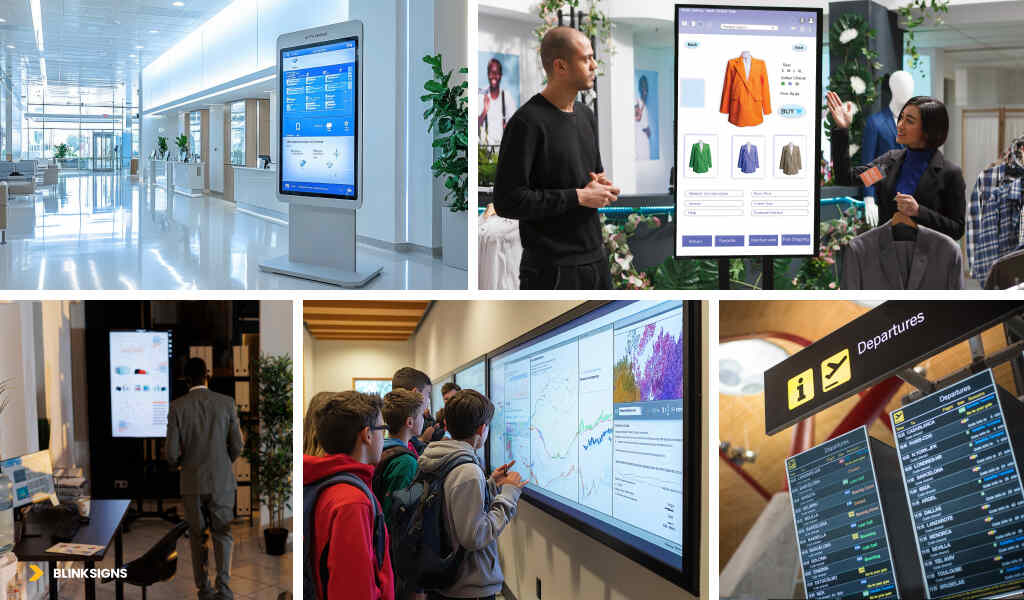
Industry Specific Wayfinding Strategies
Because hospitals ≠ , airports ≠ , corporate campuses ≠ , and malls.
Quick Industry Comparison
| Industry | Users | Required Integrations | Accuracy Needs | Best Tech | ROI Driver |
| Healthcare | Patients + visitors | EHR, BMS | High | BLE / hybrid | Fewer missed appointments |
| Corporate Offices | Employees + guests | Booking systems | Medium | Wi-Fi / hardware-free | Productivity |
| Universities | Students + staff | LMS, booking | Medium | Wi-Fi | Student satisfaction |
| Retail | Shoppers | POS/inventory | Medium | BLE | Sales conversion |
| Airports | Passengers | Flight data | High | BLE / hardware-free | Flow efficiency |
Your Next Steps: Moving From Research to Action
- Audit your wayfinding pain points
- Define your must-have vs nice-to-have features.
- Score vendors using the 10-criterion scorecard
- Plan a hybrid strategy from day one.
- Start with a pilot before committing to full deployment.
Why Partner With BlinkSigns
BlinkSigns is uniquely positioned because we deliver:
- Physical signage + digital wayfinding as a unified system
- ADA-compliant room signs, directional signs, and environmental graphics
- Digital kiosks, directories, and navigation screens
- Strategy, mapping, CMS setup, installation, and optimization
- Consistent branding across physical and digital environments
- Long-term governance support
No need for multiple vendors.
No fragmented experience.
Just a unified, intelligent navigation ecosystem.
FAQs
1. What is a digital wayfinding system?
A digital wayfinding system uses interactive screens, mobile navigation, and indoor positioning to guide visitors through complex buildings.
2. How does indoor positioning work?
It typically uses BLE beacons, Wi-Fi triangulation, or hardware-free smartphone sensors to determine the user’s real-time location.
3. What’s the difference between BLE and Wi-Fi positioning?
BLE offers higher accuracy (1–5 meters), while Wi-Fi is easier to deploy but less precise (3–15 meters).
4. Do we need kiosks if we have mobile wayfinding?
Yes. Many visitors prefer kiosks for initial orientation or may not want to download an app.
5. Can digital wayfinding work without installing new hardware?
Yes — hardware-free positioning uses smartphone sensors or visual cues, depending on the platform.
6. How accurate is indoor navigation?
Accuracy ranges from 1 meter (BLE/UWB) to 10–15 meters (Wi-Fi), depending on technology.
7. How do you make digital wayfinding accessible?
Use step-free routing, screen reader support, high contrast, large text, and ADA-compliant kiosk placement.
8. What’s the typical cost of digital wayfinding?
Costs vary by approach; use relative tiers ($/$$/$$$/$$$$) based on hardware, integrations, and scale.
9. How long does implementation take?
Most facilities complete system rollout within 6–8 months, typically using a phased approach.
10. Can digital wayfinding integrate with our existing systems?
Yes. Standard integrations include booking systems, EHR, BMS, emergency alerts, and IoT sensors.
11. How do digital and physical wayfinding work together?
Physical provides baseline direction; digital offers real-time, personalized routing.
12. What KPIs measure wayfinding success?
Key metrics: wayfinding time, direction requests, missed appointments, satisfaction scores, and staff efficiency.
13. What questions should we ask when choosing a digital wayfinding vendor?
Ask about accuracy guarantees, APIs, content management, SLAs, cost transparency, and integration history.
14. What makes a good digital wayfinding user experience?
Fast search, intuitive icons, large touch targets, 3-tap journeys, contrast, and accessibility.
15. How do we future-proof our system?
Choose open standards, modular architecture, API-first platforms, and technology that can scale.
Conclusion
Digital wayfinding has evolved beyond convenience—it’s now a core component of how modern buildings guide, inform, and support the people who move through them. The right system does more than show directions; it reduces frustration, strengthens accessibility, improves operational flow, and creates a seamless visitor experience that reflects the professionalism of your space.
When facilities combine smart digital navigation with strategic physical signage, the result is a hybrid ecosystem that’s reliable, adaptive, and future-ready. And that’s where BlinkSigns brings unique value—uniting both worlds into one intuitive, scalable solution.
If you’re ready to simplify navigation, improve user satisfaction, and future-proof your facility, our team is here to help you take the next step. →