
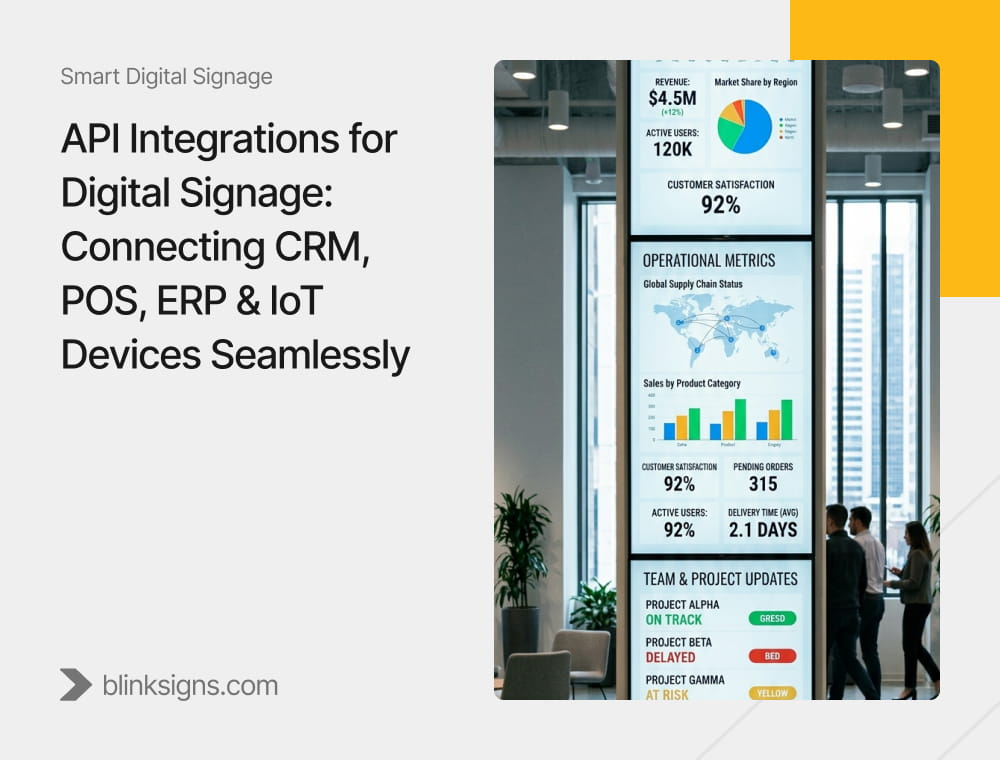
API Integrations for Digital Signage: Connecting CRM, POS, ERP & IoT Devices Seamlessly
Most digital signage deployments fail not because they lack content, but because they are disconnected from the systems that drive the business. A screen that cannot respond to real-time data is not an operational interface. It is a slideshow.
If digital signage is not integrated, it is not a system. It is a media player.
This article defines how API integrations transform digital signage into a real-time, event-driven infrastructure layer, connecting enterprise systems such as CRM, POS, ERP, and IoT into a unified, responsive communication system.
What Is API Integration for Digital Signage?
API integration for digital signage enables real-time data exchange between signage systems and enterprise platforms such as CRM, POS, ERP, and IoT devices. This allows screens to display dynamic, context-aware content triggered by live business events rather than static schedules.
Traditional signage systems rely on pre-scheduled playlists. Integrated signage systems respond to:
- Transactions
- Customer data
- Inventory changes
- Sensor inputs
- Operational signals
This transforms screens from passive displays into active decision-support interfaces embedded within the physical environment.
Why Integrated Signage Outperforms Isolated Displays
Unintegrated signage operates in isolation. Content is created manually, scheduled in advance, and remains disconnected from business reality.
Integrated signage operates within the enterprise data ecosystem.
Core Differences
| Dimension | Isolated Signage | Integrated Signage |
| Content Trigger | Time-based | Event-driven |
| Data Source | Manual input | Live system data |
| Relevance | Fixed | Context-aware |
| Business Impact | Awareness | Decision support |
Event-Driven Signage vs Scheduled Signage
The fundamental shift is from time-based publishing to event-based activation.
| Dimension | Scheduled Signage | Event-Driven Signage |
| Trigger | Time | Data event |
| Content | Pre-authored | Dynamically generated |
| Relevance | Fixed | Contextual |
| Value | Informational | Operational |
Scheduled content informs. Event-driven content responds.
The Digital Signage Integration Stack™
Modern API-connected signage systems operate across a structured architecture.
Five-Layer Model
- Data Sources
Enterprise systems, including CRM, POS, ERP, IoT devices, weather APIs, and external data feeds, generate raw data signals. - Middleware Layer
Middleware or iPaaS platforms transform and standardize data across systems, ensuring compatibility and reducing integration complexity. - Caching Layer
A critical but often overlooked component that stabilizes performance by storing recent data, reducing API calls, and maintaining uptime during system disruptions. - CMS (Content Management System)
The CMS acts as the logic engine, defining rules, triggers, scheduling conditions, and content rendering based on incoming data. - Display Surface
Screens, kiosks, video walls, and interactive displays that render the final output in real-world environments.
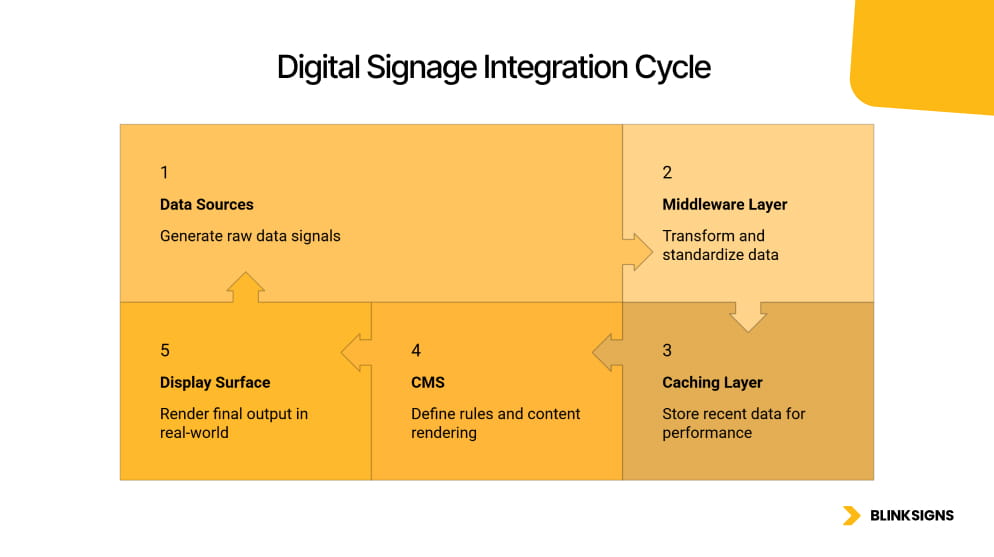
Digital Signage Integration Cycle
Integration Flow (System Logic)
Data Source → API → Middleware → Cache → CMS → Screen
This flow defines how information travels from enterprise systems to physical displays in real time.
Why the Caching Layer Is Critical
Most vendors mention APIs. Very few explain stability.
Without caching:
- API calls spike under load
- Systems slow down or fail
- Screens display outdated or blank content
With caching:
- Data is stabilized
- Refresh cycles are controlled
- System reliability increases significantly
Without caching, integrated signage becomes unstable at scale.
What Is Data-to-Display Latency?
Data-to-display latency is the time between when a data event occurs in a source system and when that information appears on a screen.
This metric determines whether a signage system is operationally effective.
Data-to-Display Latency Framework™
| Use Case | Acceptable Latency | Reason |
| IoT safety alert | < 1 second | Life-safety requirement |
| POS upsell trigger | < 3 seconds | The transaction window closes quickly |
| ERP production KPI | < 30 seconds | Operational awareness |
| CRM leaderboard | < 5 minutes | Motivational, not critical |
| Weather/social feed | < 15 minutes | Contextual relevance |
Latency is not a technical detail. It is a business constraint.
A system that cannot meet latency thresholds fails its purpose.
CRM Integration: Customer Data Activation
CRM systems such as Salesforce, HubSpot, and Microsoft Dynamics provide rich customer and performance data that can be activated through signage.
Use Cases
- Sales leaderboards are displayed in real time
- Loyalty-based personalization on in-store screens
- Customer recognition at kiosks
- Pipeline visibility for internal teams
How It Works
- CRM exposes data via REST APIs
- Middleware transforms and filters data
- CMS applies rules to determine display logic
- Screens update dynamically based on data changes
CRM integration connects customer intelligence directly to physical environments.
POS Integration: Revenue-Driven Signage
POS systems such as Shopify, Square, Toast, and SAP generate real-time transactional data.
This is one of the highest-impact revenue integrations.
Use Cases
- Dynamic menu boards
- Sold-out item removal
- Real-time promotions
- Upsell triggers based on purchase behavior
Example
A product is purchased at high frequency within a short window.
The POS system triggers a promotion on screens:
“Trending now — limited availability.”
This creates urgency and increases conversion rates.
ERP Integration: Operational Visibility
ERP systems such as SAP, Oracle, and Microsoft Dynamics provide operational data.
Use Cases
- Production KPIs on factory floors
- Inventory levels
- Supply chain updates
- Shift scheduling
ERP integration ensures employees see the same data that drives operations.
IoT Integration: Environmental Awareness
IoT systems such as AWS IoT and Azure IoT Hub provide real-time sensor data.
Use Cases
- Occupancy-triggered content
- Temperature alerts
- Motion-activated displays
- Predictive maintenance signals
IoT integration allows signage to react to physical conditions, not just digital data.
What Happens When Integration Fails?
Enterprise systems are not judged by how they perform under ideal conditions. They are judged by how they behave in the face of failure.
Failure Modes
| Failure Mode | Cause | Impact | Mitigation |
| Stale screens | API downtime | Outdated information | Cache with fallback logic |
| Data mismatch | Schema conflict | Incorrect display values | Validation layer |
| Latency spike | Poor polling strategy | Delayed updates | Webhooks instead of polling |
| Security breach | Weak authentication | Data exposure | OAuth and scoped access |
| Content failure | CMS disconnect | Blank screens | Monitoring and auto-recovery |
Integration architecture is not about connectivity. It is about reliability under failure.
API Governance for Digital Signage
Integration without governance creates risk.
Core Governance Controls
- Rate Limiting
Prevents system overload during high-frequency data events - Authentication
OAuth 2.0 and API key management ensure secure access - Access Scopes
Defines which systems can send data to specific screens - Data Validation
Prevents malformed or incorrect data from reaching displays - Logging and Monitoring
Creates audit trails and supports incident response
Integration Maturity Model™
Organizations evolve in how they integrate signage systems.
| Level | State |
| 1 | Standalone screens |
| 2 | Scheduled content |
| 3 | API-connected |
| 4 | Event-driven |
| 5 | Autonomous |
Most organizations operate at Levels 2 or 3.
The shift to Levels 4 and 5 requires architectural redesign, not incremental upgrades.
What IT Teams Evaluate Before Integration
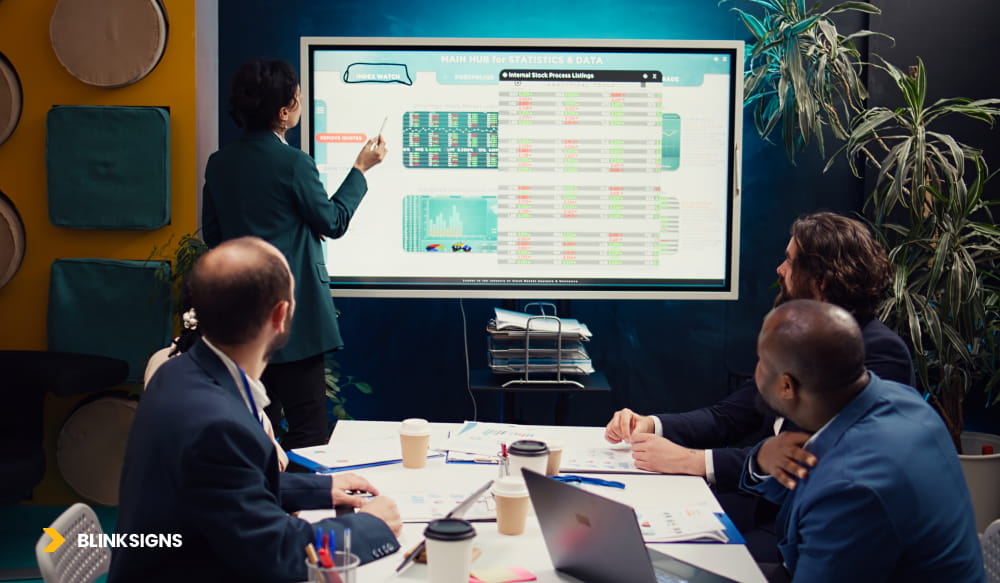
Evaluation Before Integration
Enterprise buyers evaluate integration systems using strict criteria.
| Criteria | What to Verify | Red Flag |
| System compatibility | API standards supported | Proprietary-only systems |
| Latency SLA | Defined thresholds | No guarantees |
| Security compliance | SOC 2, ISO standards | No documentation |
| Vendor support | Integration SLA | No enterprise support |
| API documentation | Full coverage | Incomplete docs |
| Scalability | Multi-system support | Single-use case |
This is where most solutions fail.
Data → Display → Decision → Outcome Loop
Integrated signage creates a measurable feedback system.
- Data is generated
- Screens update
- Employees or customers react
- Business outcomes change
- System learns and optimizes
This loop connects technical integration directly to business performance.
How Do You Measure ROI from Integrated Digital Signage?
Integration is only valuable if it produces measurable outcomes. Enterprise buyers do not invest in connectivity. They invest in impact.
Integrated signage enables a structured measurement model that connects data events to business results.
The Connected Signage Attribution Model™
This model maps integration type to measurable outcomes across the business.
| Integration Type | Trigger | Action | Business Outcome |
| POS | Transaction spike | Upsell content | Increased basket size |
| CRM | Customer segment | Personalized messaging | Higher conversion |
| ERP | Inventory change | Dynamic updates | Reduced stockouts |
| IoT | Environmental signal | Safety alert | Reduced incidents |
Why Traditional Metrics Fail
Most signage systems measure:
- Impressions
- Playback counts
- Screen uptime
These metrics do not indicate whether communication influenced behavior.
Integrated systems measure:
- Reaction
- Decision change
- Outcome shift
This is the difference between media performance and operational performance.
Business Outcome Measurement Framework
Integrated signage should be evaluated using four outcome categories:
1. Revenue Impact
- Upsell conversion rates
- Basket size increase
- Promotion performance
2. Operational Efficiency
- Reduced delays
- Faster response times
- Improved throughput
3. Safety and Compliance
- Incident reduction
- Alert response time
- Audit traceability
4. Employee Performance
- KPI visibility
- Alignment improvement
- Engagement metrics
Data Generated (CRM / POS / ERP / IoT)
↓
Screen Updated (within defined latency threshold)
↓
Employee or Customer Reacts
↓
Business Outcome Changes
(sale completed / incident avoided / KPI achieved)
↓
Analytics Feed Back Into Content Rules
↓
Next Trigger Fires
↓
(loop continues)
This loop does not end. Every trigger event generates new data, which refines the rules, which in turn improve the next trigger. Organizations that deploy integrated signage are not deploying a communication tool. They are deploying a self-improving operational system.
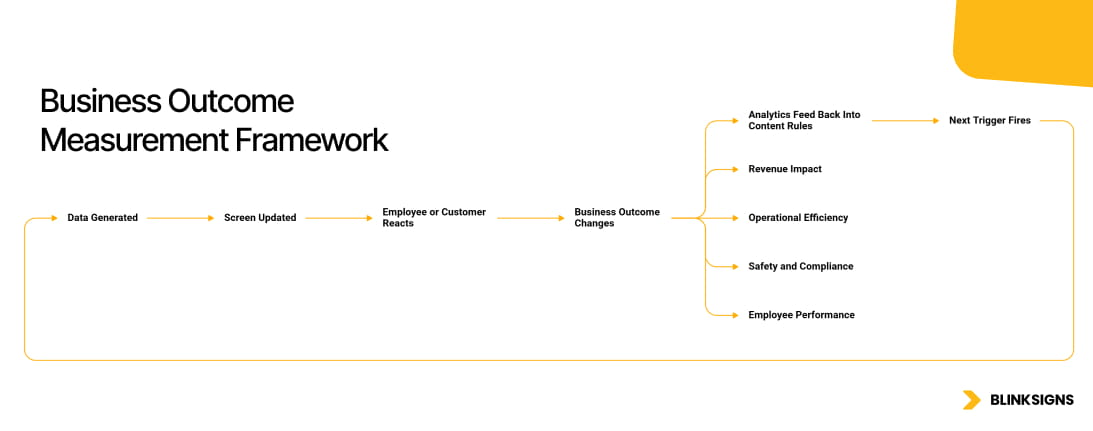
Business Outcome Measurement Framework
Advanced Use Cases Across Industries
Retail: Real-Time Revenue Optimization
Retail environments benefit most from POS and CRM integrations.
Scenario:
- POS detects high demand for a product
- Inventory drops below threshold
- Screen displays urgency messaging
Outcome:
- Increased conversion
- Reduced overstock risk
POS detects high demand for a product category. Inventory drops below the defined threshold. The CMS rule fires a scarcity overlay — “Trending now — limited availability” — triggered by the POS webhook within three seconds of the inventory event. The result is a measurable compression of the decision cycle at the point of highest purchase intent.
Manufacturing: Production Floor Intelligence
ERP integration transforms factory floors into real-time dashboards.
Scenario:
- Production line slows down
- ERP system updates KPI
- Screens display a performance alert
Outcome:
- Faster corrective action
- Reduced downtime
The ERP system detects a slowdown in production output. KPI thresholds are breached. The CMS triggers an alert across production-floor displays, highlighting performance deviations in near real time based on ERP data refresh cycles. This enables supervisors to intervene immediately, reducing downtime and preventing cascading inefficiencies.
Logistics: Throughput Optimization
Logistics environments rely on speed and coordination.
Scenario:
- The dispatch system updates the queue
- Screens show updated loading priorities
Outcome:
- Reduced bottlenecks
- Improved delivery timelines
The dispatch system updates queue priorities based on shipment status. Screens automatically reflect updated loading sequences using API-fed logistics data. The CMS dynamically prioritizes high-urgency shipments, ensuring teams act on real-time priorities rather than static schedules, improving throughput and reducing delays.
Healthcare: Real-Time Patient Flow
IoT and ERP integrations support operational efficiency.
Scenario:
- Sensor detects patient movement
- System updates room availability
- Screens guide staff
Outcome:
- Reduced wait times
- Improved patient experience
IoT sensors detect patient movement and changes in room availability. Data is sent through the integration layer and reflected on staff-facing screens within seconds. The CMS updates routing and room status dynamically, enabling faster coordination between teams and reducing patient wait times through real-time visibility.
Implementation Phases for API-Connected Signage
Integration must follow a structured deployment process.
Phase 1: System Audit
- Identify existing systems (CRM, POS, ERP, IoT)
- Evaluate API availability
- Assess data quality
Phase 2: Architecture Design
- Define an integration model
- Select middleware
- Establish latency requirements
Phase 3: Integration Development
- Configure API connections
- Implement data transformations
- Set up caching and validation
Phase 4: Testing and Validation
- Simulate real-world scenarios
- Test failure conditions
- Validate latency thresholds
Phase 5: Deployment and Monitoring
- Roll out across locations
- Monitor system performance
- Optimize based on outcomes
How Do You Automate Digital Signage Content Updates?
Automation is achieved through event-driven rules defined within the CMS.
Example Logic
- If inventory < threshold → show scarcity message
- If sales spike → display trending product
- If temperature exceeds limit → trigger alert
Automation reduces manual effort and ensures content remains relevant.
Webhooks vs API Polling in Digital Signage
Two methods are commonly used for data retrieval.
| Method | Description | Advantage | Limitation |
| Polling | System checks for updates at intervals | Simple | Latency and inefficiency |
| Webhooks | System receives updates instantly | Real-time | Requires setup |
Webhooks are preferred for low-latency, high-impact use cases.
What Is IoT Digital Signage?
IoT digital signage integrates sensor data with display systems to enable context-aware communication.
Examples
- Motion sensors trigger content
- Temperature sensors display alerts
- Occupancy sensors adjust messaging
This creates an environment where screens respond to physical conditions.
Security and Compliance Considerations
Integration introduces risk if not managed properly.
Key Requirements
- Encrypted data transmission
- Secure API authentication
- Role-based access control
- Audit logging
Compliance standards such as SOC 2 and ISO frameworks must be met for enterprise deployments.
Frequently Asked Questions
What is API integration for digital signage?
API integration for digital signage enables systems such as CRM, POS, ERP, and IoT platforms to exchange data with signage software in real time. This allows screens to display dynamic, context-aware content triggered by business events rather than static schedules, transforming signage into a responsive, event-driven operational interface connected directly to enterprise systems.
How does digital signage connect to CRM systems?
Digital signage connects to CRM systems through REST APIs or middleware platforms that extract customer and performance data in real time. This data is processed and mapped to display rules within the CMS, enabling use cases such as sales leaderboards, loyalty messaging, and customer recognition that bring CRM insights into physical environments where employees and customers interact.
Can digital signage integrate with POS in real time?
Yes, digital signage integrates with POS systems in real time via APIs or webhooks that trigger content updates immediately after transactions. This enables dynamic menu boards, automatic removal of out-of-stock items, and upsell messaging triggered within seconds, ensuring that displayed content always reflects current sales activity and purchasing behavior.
How does ERP integration work with digital signage?
ERP integration connects operational data such as inventory levels, production metrics, and schedules to signage systems through APIs or middleware. This data is displayed in real time on screens across facilities, providing employees with immediate visibility into performance and enabling faster, data-driven decisions that improve operational efficiency and coordination.
What is IoT digital signage?
IoT digital signage refers to signage systems that respond to real-time sensor data from connected devices such as motion detectors, temperature sensors, and occupancy trackers. This allows screens to display context-aware content triggered by environmental conditions, enabling use cases such as safety alerts, energy monitoring, and adaptive messaging in physical environments.
What is data-to-display latency?
Data-to-display latency is the time between when a data event occurs in a source system and when that information appears on a connected screen. It is the foundational performance metric for integrated signage because it determines whether a system is operationally effective or merely connected. In safety-critical environments such as manufacturing and logistics, latency thresholds are compliance requirements, not preferences.
What is the difference between webhook and API polling in signage?
Webhook-based systems push data instantly when events occur, while API polling retrieves data at scheduled intervals. Webhooks provide significantly lower latency and higher efficiency, making them ideal for real-time signage applications, whereas polling introduces delays and increases system load, particularly in high-frequency data environments.
How do you secure API integrations in digital signage?
API integrations are secured using authentication methods such as OAuth 2.0, encrypted data transmission, and role-based access controls. Additional safeguards include rate limiting, schema validation, and continuous monitoring, ensuring that data flows remain secure, compliant, and protected against unauthorized access or misuse of systems.
How do you measure ROI from integrated digital signage?
ROI is measured by tracking how integration-driven content influences measurable business outcomes such as revenue growth, operational efficiency, and safety improvements. This includes conversion rates, response times, and incident reduction, linking integration performance directly to financial and operational results rather than passive visibility metrics.
What is the Integration Maturity Model for digital signage?
The Integration Maturity Model for digital signage defines five stages of system evolution: standalone screens, scheduled content, API-connected systems, event-driven networks, and fully autonomous platforms. It provides organizations with a structured framework for assessing current capabilities, identifying gaps, and prioritizing architectural changes to achieve real-time operational performance.
Conclusion
Digital signage is no longer a content system. It is a real-time interface connected to business data.
Organizations that fail to integrate their signage systems will continue to operate in isolation, limiting their ability to respond to real-world conditions.
Connected signage transforms screens into decision-making tools, enabling businesses to react faster, operate smarter, and communicate more effectively.
Design Your Integration Architecture
If your signage system is not connected to your business data, it is not operating at its full potential.
Map your current systems, define your integration architecture, and build a signage network that responds in real time.
Download the API Integration Checklist™ to assess your readiness and launch smarter, real-time digital signage integrations.