
Enterprise Content Governance: How Multi-Location Brands Control 100–5,000 Screen Networks
If you manage a multi-location screen network, “more screens” is not just more content. It is riskier.
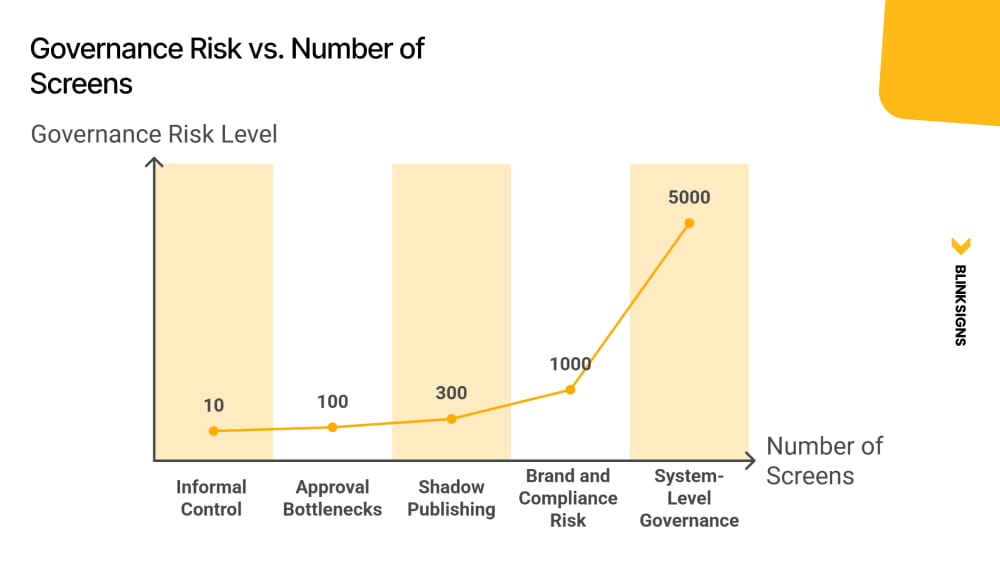
Around 10 screens, you can run on informal approvals, shared folders, and tribal knowledge. Once your network crosses the low hundreds, those habits turn into liabilities: brand drift, compliance gaps, approval bottlenecks, and the quiet rise of bypass behavior that nobody can audit.
This article is a doctrine-level guide for enterprise digital signage governance. It is written for the leaders who end up accountable when something goes wrong:
- CIOs and IT Directors who need identity control, audit trails, and enforceable scope boundaries
- Brand and Marketing leaders who need consistency at scale without slowing local operations
- Internal Comms and Operations leaders who need speed, reliability, and crisis readiness
- Franchise and regional owners who need autonomy inside guardrails, not endless HQ tickets
The central thesis is simple and non-negotiable:
Governance depth must scale with screen risk and network size, not organizational hierarchy, feature lists, or vendor defaults.
Every section operationalizes that thesis. If a governance decision feels unclear, the answer is almost always the same: classify the screen risk first, then design governance proportional to that risk.
Why Governance Breaks at 100+ Screens
Enterprise content governance for digital signage is the operating system that determines who can publish what content. On these screens, under which rules, with what approval path, and with what accountability trail, at any network scale.
Governance Risk vs. Number of Screens
The Governance Trap
Most networks fail in one of two predictable ways:
- Over-broad governance scope
Local teams are granted access that reaches high-visibility screens. A well-meaning update becomes a brand incident when the system allows the wrong person to publish to the wrong audience.
- Over-tight governance scope
Routine local updates require HQ approval. The approval queue becomes the bottleneck. The network slows down. Urgent updates miss their window. Teams stop trusting the system.
Both patterns create the same outcome: your governance model becomes either a risk multiplier or an operational blocker.
Shadow publishing is the consequence.
Shadow publishing is what happens when governance becomes more painful than the alternative of ignoring it. A local team creates content in a personal Canva account, loads it onto a USB drive, and plugs it directly into the display. The audit trail is gone. The brand standard is gone. And no one knows it happened.
This behavior is not “a training problem.” It is a systems design problem.
A critical nuance: shadow publishing is most likely in High and Low risk classes when approval workflows are mis-scoped for those screen types, either too burdensome for the risk level or not burdensome enough to prevent unsafe reach.
Why “around 100 screens” is different than 10
At 10 screens, informal controls can still hold because:
- The same people see most updates
- Exceptions are visible quickly.
- Mistakes are containable
- Corrections do not require infrastructure.
Once networks cross the low hundreds, the system changes:
- You now have content velocity across regions, teams, and time zones
- Local urgency becomes constant.
- Risk exposure expands, especially on customer-facing and regulated screens.
- Manual enforcement becomes inconsistent.
The solution is not a stricter policy. It is a governance architecture proportional to risk, and the first step is classifying that risk.
Screen Risk Classification: The Backbone of Every Governance Decision
You cannot design an approval workflow, a role structure, or a tenant architecture until you know which screens carry which risk.
This is the governance mistake most teams make: they start with roles, vendor defaults, or an org chart. That approach fails because it assumes that governance should follow a hierarchical structure.
In enterprise signage networks, governance follows exposure.
The four screen classes
| Screen Class | Risk Level | Approval Model | Examples |
| Global Brand Flagship | Critical | Multi-step + legal review | HQ lobbies, flagship stores, airport concessions, stadium signage |
| Customer-Facing Ops | High | Conditional routing | Retail floor, QSR menus, hotel lobbies, bank branches |
| Internal Operations | Low | Auto-publish with template guardrails | Warehouse, factory floor, break room, back-of-house |
| Regulated / Compliance | Legal-Mandatory | Mandatory parallel review | Healthcare disclosure, financial services, pharmacy, and legal office |
Core principle: Governance depth must be proportional to screen risk, not organizational seniority. A warehouse manager publishing to an internal ops screen poses less governance risk than a regional marketer editing a customer-facing QSR menu board.
How to classify every screen in your network
Use a three-dimensional scoring framework that is explicit enough to turn into a worksheet, a policy appendix, and a CMS tag model.
| Classification Dimension | Score 0 | Score 1 | Score 2 |
| Audience exposure | Internal only | Semi-public | Fully public/external |
| Harm impact | Operational disruption | Brand or reputational | Legal, safety, or regulatory |
| Regulatory burden | None | Internal policy only | Legally mandated |
Scoring rules:
- Total 0–2: Internal Operations
- Total 3–4: Customer-Facing Ops
- Total 5: Global Brand Flagship
- Any Regulatory Burden score of 2: automatically Regulated / Compliance, regardless of total score
This classification gives you the organizing logic for everything downstream: approval depth, routing rules, role scope, tenant boundaries, logging requirements, proof-of-play expectations, and emergency override authority.
When a screen changes class, governance must respond
Screens change class more often than teams expect. Governance that does not adapt becomes stale and unsafe.
Common triggers:
- Remodels that increase public visibility
- Repurposing screens from internal to customer-facing
- Adding pricing, promotions, or regulated disclosures
- Entering a new market with new regulatory requirements
- Moving screens into higher-risk physical locations (lobbies, entrances, queues)
Governance should treat reclassification as a formal change event: update tags, routing, scope boundaries, and audit posture.
Practical rule: Start here. Before assigning a single role or writing a single policy, classify every screen in your network.
The Three Governance Operating Models and Which One Breaks at Scale
Once you have risk classification, you can choose an operating model. This is the strategic decision. Everything else is implementation.
Here is the model framework that actually holds at scale, including where each model breaks and the first measurable indicator that you are approaching failure.
| Model | Best Fit | Screen Count Range | Where It Breaks | Failure Indicator |
| Centralized | Tightly branded retail, regulated industries | 100–300 | HQ approval bottleneck, local urgency unmet | HQ approval backlog exceeds 5 business days |
| Hybrid | Multi-brand enterprise, franchises, corporate campus | 300–2,000 | Scope boundary gaps create shadow publishing | Region overrides or escalations increase >20% month-on-month |
| Decentralized | Internal comms, large campuses, autonomous BUs | 500–5,000+ | Brand drift, inconsistent standards, weak audit trails | Audit trail completeness drops below 85% |
Default recommendation for enterprise networks
For most enterprise networks with 300 to 2,000 screens, hybrid governance is the default, provided scope boundaries between corporate, regional, and local publishing are explicitly defined and CMS-enforced, not just documented in a policy deck.
Hybrid is not “some central and some local.” Hybrid is scoped autonomy.
Why centralized governance fails once networks reach the low hundreds
Centralized governance is attractive because it looks clean:
- One team controls publishing
- Brand consistency improves initially.
- Compliance feels manageable
But centralized governance collapses when local urgency becomes constant:
- Promotions, hours, staffing, local events, seasonal updates
- Operational notices and safety messaging
- Rapid shifts due to inventory, weather, and outages
If every routine update must pass through HQ, the system creates backlog pressure, which triggers bypass.
Why decentralized governance at scale requires the most sophisticated infrastructure
Decentralized governance sounds “lighter,” but at 500 to 5,000 screens, it requires the strongest enforcement architecture:
- Directory-driven RBAC
- Tenant boundaries that prevent scope creep
- Locked templates and brand zones
- Mandatory logging and proof-of-play readiness
- Clear incident response and override controls
Without infrastructure, decentralization becomes brand drift plus weak accountability.
Transition: Choosing a governance model is a strategic decision. Designing the approval chains is the operational one.
The Three Approval Chain Models: Matching Workflow Depth to Screen Risk
Content Publishing Workflow Routing Logic
Most content workflows describe a single linear path: create, review, approve, publish.
That is not enterprise signage governance. At scale, one-size approval creates the Governance Trap:
- Too strict for low-risk screens, creating a backlog and bypass
- Too loose for high-risk screens, creating incidents
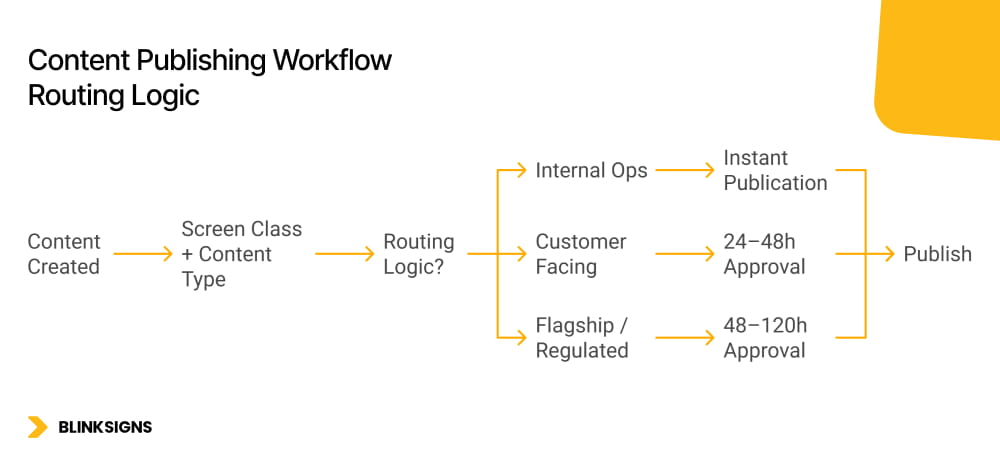
A risk-proportional system uses three approval tracks, plus conditional routing that automatically assigns content to the correct track based on screen class and content type.
Track 1: Auto-publish with template guardrails
Best for: Internal Operations screens (Low risk)
Who uses it: local operators, warehouse managers, internal comms leads
SLA: immediate, no approval queue
Guardrail principle: The template is the approval. If the content fits the template, it publishes. If it requires breaking the template, it triggers Track 2.
How guardrails work in practice:
- Pre-approved template library
- Locked brand zones (logos, colors, disclaimers, fixed layout)
- Editable zones designed for operational content (text blocks, metrics, status)
- Restricted asset uploads in high-exposure elements
Content lifecycle enforcement
- Default auto-expiration (TTL) for internal ops content, for example, 30 days
- Recertification is required to extend with a named content owner.
- This prevents stale notices from becoming permanent background noise.
Track 2: Single-step conditional approval
Best for: Customer-Facing Ops screens (High risk)
Who reviews: regional brand or marketing manager
SLA: 24 to 48 hours, defined in governance policy and tracked as a KPI
This track exists because customer-facing updates carry brand and pricing sensitivity, but still require operational speed.
Conditional escalation trigger: if content touches pricing, promotions, or brand identity, it automatically escalates to Track 3.
Content lifecycle enforcement
- Promotional content auto-expires at campaign end date, set at publish time.
- Evergreen content recertified quarterly
- Expiry accountability remains explicit, with a named owner and review date.
Track 3: Parallel multi-domain approval
Best for: Global Brand Flagship and Regulated screens (Critical and Legal-mandatory)
Who reviews: brand team and legal/compliance team in parallel
SLA: 48 to 120 hours, depending on regulatory complexity
Parallel routing is structural. Sequential routing is how approval chains become multi-week bottlenecks.
Post-approval lock
- Approved content version is locked
- Any edit restarts the whole approval chain.
- This protects compliance and prevents silent drift.
Content lifecycle enforcement
- Regulated content carries a mandatory review date.
- Expiry triggers automatic removal and re-approval requirement, not just a notification
- Compliance content that is out of date must not continue running by default.
Audit output requirements
- Complete approval chain documented for compliance reporting.
- Approver identity, timestamp, version, and domain reviewed are all recorded.
Conditional routing logic
Conditional routing is the mechanism that keeps governance proportional and scalable:
Screen class tag + content type tag → routing rule → approval track assignment
This must be enforced in the CMS. If routing depends on a human remembering the rules, it will fail under load.
How to build a risk-based approval workflow for a 500+ screen network
- Classify all screens using the 3-dimensional scoring framework.
- Define content types applicable to each screen class.
- Map each content type to the correct approval track (auto, single-step, parallel)
- Define conditional routing rules using the screen class tag and the content type tag.
- Set SLA targets per track (Track 1: immediate; Track 2: 24–48h; Track 3: 48–120h)
- Implement routing enforcement in your CMS, not just in policy documentation.
- Pilot the workflow in a single region before network-wide rollout.
- Measure in month one: bypass incidents, SLA adherence rate, shadow publishing frequency
Why Your Identity Provider, Not Your CMS, Is the Real Governance Control Plane
Most enterprises make the same structural mistake.
They configure roles manually inside the digital signage CMS. A marketing coordinator is given “regional editor” access. A contractor is granted temporary upload rights. Months later, that contractor leaves. IT deactivates their corporate directory account, but their CMS account remains active.
That is not a CMS limitation. That is a governance failure.
Enterprise digital signage governance must treat the identity provider as the control plane, not the CMS.
SSO as the authentication boundary
Every CMS session should be authenticated through enterprise SSO, tied to a verified corporate identity in Microsoft Entra ID, Okta, or Google Workspace.
That achieves three things immediately:
- Eliminates shared logins
- Ties every publish, approval, and permission change to a real person.
- Aligns with enterprise access control frameworks such as NIST SP 800-53 AC-2 (Account Management) and AU-2 (Event Logging)
If your signage CMS uses a standalone username-and-password database, you do not have enterprise governance. You have a content tool with a login screen.
Directory group to CMS role mapping
The correct pattern is not:
“Create a user in the CMS and assign a role.”
The correct pattern is:
“Add the user to the correct directory group. The CMS inherits the role automatically.”
This means:
- Roles are derived from directory groups, not assigned manually inside the CMS
- When group membership changes, role scope changes automatically
- Offboarding in the directory propagates to signage access without waiting for someone to remember to revoke it.
This model is defensible in audit and scalable in operations.
SCIM-based lifecycle automation
Modern identity platforms support automated provisioning and deprovisioning using standards such as SCIM.
In practice, this means:
- New hire joins regional marketing → added to “Regional_Signage_Publishers” group → CMS access granted automatically
- Employee transfers to a different function → removed from group → publishing rights change instantly.
- Employee departure → restricted in directory → CMS access revoked within minutes
This is lifecycle automation, not manual IT ticketing.
Manual offboarding creates a hidden compliance gap. SCIM-driven provisioning closes it.
Just-in-time provisioning for contractors
Large screen networks rely on agencies, designers, and contractors.
Governance should support:
- Time-bounded access
- Automatic expiration of access
- Group-based role inheritance
- MFA enforcement
Contractors should not have persistent access long after their engagement ends. Governance must treat temporary identity as a first-class scenario.
Audit identity traceability
Every governance model must answer one question cleanly:
“If something goes wrong on a screen, can you identify exactly who published or approved it?”
That requires:
- Verified enterprise identity
- Logged publish events
- Logged approval actions
- Logged permission changes
- Protection of audit logs against tampering
Governance depth must match screen risk. On regulated and flagship screens, identity traceability is not optional.
Multi-Tenant CMS Architecture: The Infrastructure That Makes Governance Enforceable
Policy tells people what to do. Architecture makes it impossible to do otherwise.
Multi-tenant CMS architecture is not a configuration detail. It is governance infrastructure.
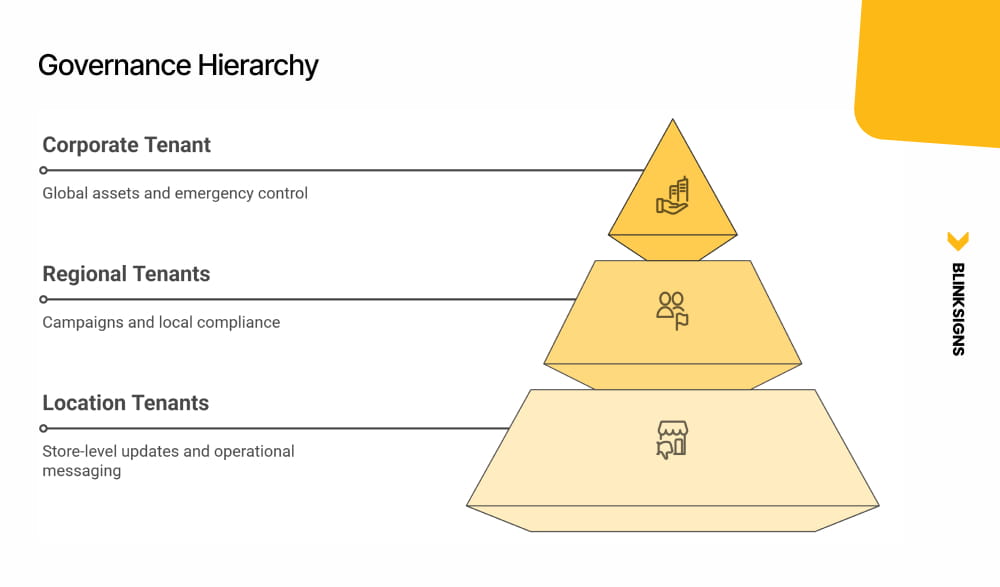
The answer to “How do you govern 5,000 screens?” is not a policy document. It is tenant segmentation.
Governance Hierarchy
The three-tier tenant model
1) Corporate Master Tenant
- Global brand assets
- Locked templates
- Global emergency playlists
- Controller device registry
- Compliance baseline rules
- Publish rights: HQ only.
2) Regional Tenants
- Regional campaigns
- Localized compliance rules
- Regional scheduling overrides
- Publish rights: regional brand managers within a defined scope.
3) Location / Device Tenants
- Site-specific operational content
- Local event screens
- Day-part scheduling
- Publish rights: local operators within template guardrails only.
Cross-tenant bleed prevention
In a properly designed architecture:
- A location operator cannot publish to a regional or corporate screen
- A regional manager cannot modify locked global playlists.
- A corporate publisher cannot accidentally overwrite location-specific operational screens.
These are not policy violations. They are architectural impossibilities.
This is where governance moves from aspiration to enforcement.
Mapping tenant structure to governance operating models
- Centralized governance: Master tenant active, regional and location tenants restricted
- Hybrid governance: All three tiers are active with defined handoff points
- Decentralized governance: Regional and location tenants operate with strong guardrails and identity enforcement
The scaling rule
Add screen count by adding location tenants, not by expanding permission scopes.
Expanding permission scopes increases risk exposure geometrically. Adding tenants maintains containment boundaries.
Franchise Screen Governance: Mapping Legal Agreements to CMS Controls
Franchise networks introduce a distinct tension:
The franchise agreement defines what a franchisee can change. The CMS must enforce it. Policy alone does not survive a motivated local operator with a deadline.
Franchise screen governance is not generic brand governance. It is contract enforcement translated into system design.
Four enforceable franchise controls
1) Locked corporate playlists
Corporate controls:
- National campaigns
- Legal disclosures
- Brand standards
- Required safety content
Franchisees cannot remove or edit these playlists. They can only supplement them in designated zones.
2) Scoped publishing zones
Screens are divided into zones:
- Corporate-locked brand zones
- Franchise-editable local zones
Franchisees can update:
- Store hours
- Local specials
- Staff recognition
- Community messaging
They cannot edit:
- Core brand visuals
- National pricing
- Regulatory disclosures
This is scope enforcement, not suggestion.
3) Pre-approved template library
Franchisees select from approved designs.
They do not upload arbitrary creative.
Brand compliance becomes structural:
- Locked typography
- Locked layout regions
- Controlled asset libraries
- Restricted color palettes
Governance depth matches screen risk while preserving operational speed.
4) Corporate audit reporting
The corporation must be able to:
- Pull proof-of-play reports per location
- Verify campaign compliance
- Confirm required disclosures ran.
- Audit without field visits
A franchisee should manage their screens without calling corporate for standard approvals. The corporation should audit every location without visiting it.
In regulated franchise sectors such as healthcare and financial services, these controls are legal obligations, not brand preferences.
Emergency Override Governance: Who Can Push, What It Covers, and How It Reverts
Every digital signage vendor supports emergency override.
Almost no enterprise writes the governance rules that determine who can use it and how.
That gap is where liability lives.
1) Trigger authority matrix
| Override Level | Scope | Who Can Trigger | Example |
| Global | All screens, all locations | CISO / CEO / designated crisis lead | Evacuation, active threat |
| Regional | All screens in a geography | Regional operations director | Severe weather, localized emergency |
| Location | Single-site screens | Site safety officer | Fire alarm, lockdown |
| Content | Specific playlist retraction | Communications lead | Retract incorrect content |
Authority must be explicit and documented.
2) Time-to-live rules
Every override must include a mandatory TTL.
- Override auto-reverts to previous approved content at expiration.
- Extending override requires human re-trigger
- Overrides do not continue passively.
This prevents emergency messaging from becoming permanent by accident.
3) Scope containment
A location-level override cannot escalate to regional scope without authority elevation.
This prevents misuse and protects broader network integrity.
4) Logging and post-incident review
Every override event must log:
- Trigger identity
- Timestamp
- Scope
- Content pushed
- Duration
- Revert timestamp
Logs should be immutable and reviewable in accordance with incident-handling procedures aligned with frameworks such as NIST SP 800-53 IR-4.
Post-incident review should occur within defined timeframes.
5) Abuse prevention
Override capability should require MFA re-authentication at trigger time, separate from regular CMS sessions.
Override power is high-risk by definition. Governance depth must reflect that risk.
Pre-approved incident templates
Emergency content should be drafted and approved in advance:
- Evacuation routes
- Lockdown instructions
- Severe weather alerts
When a crisis happens, governance speed must not depend on creative drafting.
Architecture enables speed. Governance defines authority.
Proof-of-Play Is Not an Analytics Feature. It Is a Compliance Output.
In most vendor marketing, proof-of-play is positioned as a reporting tool for advertisers.
In enterprise governance, proof of play is the compliance output that closes the loop.
Approval confirms that the right content was authorized.
Proof-of-play confirms that the right content was actually displayed for the required period.
Both are required for a defensible governance record.
Healthcare environments
In healthcare, certain disclosures and patient rights notices must be displayed. Safety communications and operational alerts may carry regulatory weight.
Proof-of-play provides documentation that:
- Specific content ran
- On specific screens
- For a defined duration
- Within required timeframes
In audit or litigation, “we intended to display it” is not sufficient. Demonstrable display history matters.
Financial and legal services
Financial institutions and legal environments often require mandated disclosures tied to pricing, products, or services.
Proof-of-play becomes the difference between:
- Intent to comply
- Demonstrable compliance
Timestamp, location, duration, and version data transform governance from assumption into evidence.
Franchise networks
In franchise models, the corporate must confirm that:
- National campaigns ran
- Required disclosures were displayed.
- Brand-standard content was not replaced or omitted.
Proof-of-play allows audit without physical inspection.
Vendor co-op and paid campaigns
In retail networks, CPG vendors often fund campaigns across multiple locations.
Proof-of-play becomes the delivery confirmation:
- Screen
- Location
- Time window
- Duration
- Impression estimate
From a governance standpoint, this is not marketing analytics. It is accountability.
Lifecycle connection
Proof-of-play must confirm that content was displayed for the whole required period, not merely that it ran once.
If regulated content carries a mandatory display window, proof-of-play must show continuity.
Approval is the input.
Proof-of-play is the output.
Governance without both is incomplete.
Governance KPIs: How to Know Your Model Is Actually Working
A governance model without KPIs is a policy document.
A governance model with KPIs is an operating system.
If your organization cannot answer the following questions with data, governance is still aspirational.
| KPI | What It Measures | Target Benchmark |
| Approval SLA adherence | Percentage of approvals completed within the defined SLA per track | ≥95% per track per month |
| Shadow publishing incidents | Content published outside the approved CMS workflow | Zero tolerance for Critical and Regulated screens; trending to zero for others |
| Override events | Count, duration, scope, and auto-revert success rate | 100% revert success; post-incident review within 48 hours |
| Screen risk classification coverage | Percentage of screens with the current documented risk class | 100% before the governance model goes live |
| Time to remove noncompliant content | Detection to removal, by screen class | Critical/Regulated <1 hour; High <4 hours; Low <24 hours |
| Proof-of-play audit response time | Time to produce a complete proof-of-play report | <24 hours for any screen, any date |
Why these KPIs matter
- Approval SLA adherence ensures workflow depth is not creating bottlenecks.
- Shadow publishing incidents reveal whether governance is mis-scoped.
- Override metrics ensure emergency controls are not abused or left active.
- Classification coverage confirms the backbone logic is intact.
- Removal time measures risk containment capability.
- Proof-of-play response time measures audit readiness.
These KPIs are also what distinguish governance maturity levels.
Organizations at Level 1 cannot measure these.
Organizations at Level 4 routinely track them.
Organizations at Level 5 automate them into executive dashboards.
The Enterprise Screen Governance Maturity Model: Where Does Your Network Stand Today?
Enterprise governance maturity is not theoretical. It is observable.
The following five-level model is specific to multi-location digital signage networks.
| Level | Name | Governance State | Key Indicators |
| 1 | Ad Hoc | No governance | Shared logins, no roles, expired content on screens, no audit trail |
| 2 | Reactive | Governance by exception | Informal roles, approvals via email or chat, IT as the default gatekeeper, and shadow publishing are common |
| 3 | Defined | Structured governance | Written policy, formal roles, CMS permissions enforced, screen groups defined, approval workflow documented |
| 4 | Governed | Systematic governance | Screen risk classification active, identity-provider-enforced RBAC, conditional approval routing, multi-tenant architecture, audit trails operational, proof-of-play accessible, KPIs tracked |
| 5 | Optimized | Strategic governance | Automated compliance logging, governance KPIs in executive dashboards, pre-approved override templates, governance model adapts to new markets and formats |
Self-assessment scorecard
Score each question from 0 to 2.
| # | Question | 0 | 1 | 2 |
| 1 | Do all users authenticate via SSO tied to your corporate identity provider? | No | Partial | Yes, all users |
| 2 | Are CMS roles derived from directory groups rather than manually assigned? | No | Partial | Yes, fully |
| 3 | Is every screen in your network classified by risk level? | No | Some screens | All screens |
| 4 | Do you have a documented approval workflow with defined SLAs? | No | Documented, no SLAs | Documented with SLAs |
| 5 | Do different approval tracks exist for different risk classes? | No | One track for all | Three tracks with routing |
| 6 | Is your CMS structured in a multi-tenant model? | No | Partial | Full three-tier model |
| 7 | Can you generate proof of play for any screen within 24 hours? | No | Some screens | All screens |
| 8 | Do you have a documented emergency override governance protocol? | No | Basic notes | Full five-dimensional protocol |
| 9 | Has your governance policy been reviewed in the last 12 months? | No | In progress | Yes |
| 10 | Can you confirm that zero screens use shared or unnamed credentials? | No | Partially confirmed | Fully confirmed |
Score interpretation
- 0–6: Level 1–2 (Ad Hoc / Reactive)
Governance is a liability surface. Identity control and tenant architecture require immediate attention.
- 7–12: Level 3 (Defined)
Governance exists on paper. Enforcement gaps remain. Priorities: identity-layer integration, conditional routing, and tenant boundaries.
- 13–18: Level 4 (Governed)
Strong foundation. Focus shifts to KPI automation, override discipline, and franchise audit scalability.
- 19–20: Level 5 (Optimized)
Governance is a competitive asset. Continue adaptation as formats, markets, and regulations evolve.
If you’re planning or restructuring a multi-location screen network, the Enterprise Screen Governance Blueprint gives you a structured starting point.
Use it to:
- Classify every screen by risk
- Design approval workflows
- Track governance KPIs
- Assess your maturity level
Download the blueprint and start implementing immediately⤵︎
Frequently Asked Questions
What is enterprise digital signage governance?
Enterprise digital signage governance is the operating system that determines who can publish what content. On these screens, under which rules, with what approval process, and with what accountability trail across a network of any size.
How many screens require formal governance?
Formal governance becomes necessary once informal approvals no longer scale, typically as networks cross the low hundreds of screens. At that point, undocumented processes create brand risk, compliance gaps, and shadow publishing.
What is shadow publishing?
Shadow publishing occurs when team members bypass the official CMS governance workflow and load content directly to screens because the formal process is too slow or mis-scoped. It is the primary consequence of governance mismatch.
What is the difference between centralized, hybrid, and decentralized governance?
Centralized concentrates publishing authority at HQ. Hybrid distributes publishing across corporate, regional, and local tiers with defined boundaries. Decentralized grants provide broad local authority but require strong infrastructure to prevent drift.
Why does screen risk classification matter?
Screen risk classification assigns each screen to a defined risk class based on exposure, impact, and regulatory burden. Governance depth, approval track, and audit requirements must be proportional to that class.
How should emergency override be governed?
Emergency override governance requires defined trigger authority, time-to-live rules with auto-revert, scope containment, immutable logging, and MFA re-authentication at trigger time.
What is proof-of-play in governance terms?
Proof-of-play is the documented record that specific content ran on specific screens for particular durations. In regulated industries, it is a compliance output, not just an analytics report.
What RBAC model should enterprises use?
Enterprises should implement directory-group-based RBAC where CMS roles are inherited from identity provider groups rather than assigned manually. SCIM-based lifecycle automation ensures access changes propagate immediately.
What governance KPIs should be tracked?
Approval SLA adherence, shadow publishing incidents, override metrics, classification coverage, time-to-remove noncompliant content, and proof-of-play audit response time.
What is the most common governance failure?
The most common failure is scope mismatch. Over-broad access creates incidents. Over-tight workflows create bypass. Both are forms of the Governance Trap.
From Governance Policy to Governance Architecture
At BlinkSigns, we do not treat governance as a slide deck.
We design and deploy screen networks where:
- Risk classification drives workflow depth
- Identity providers enforce role scope.
- Tenant boundaries prevent scope creep,
- Emergency override is governed, not improvised.
- Proof-of-play completes the compliance loop.
- KPIs turn governance into an operating system.
Governance depth must match screen risk.
If your network spans 100 to 5,000 screens, the question is no longer whether you need governance; it’s whether you need governance. The question is whether your governance model is proportionate, enforceable, and measurable.