
Large-Scale Digital Signage Deployments: A Framework for Rolling Out 500–5000 Screens Across Multiple Regions
Most large-scale digital signage deployments do not fail because of bad hardware or wrong software. They fail because the organization treated a deployment as a rollout rather than a program.
At a small scale, deployment is a problem of installation. At enterprise scale, deployment becomes an orchestration problem across infrastructure, governance, operations, and human systems. A 50-screen rollout can be managed with a project plan. A 5,000-screen deployment requires a structured program with defined phases, ownership, monitoring, and performance metrics.
This article defines the Enterprise Deployment Program Model™, a complete framework for executing multi-region digital signage deployments at scale.
What Is a Large-Scale Digital Signage Deployment?
A large-scale digital signage deployment is a coordinated program for installing, configuring, and operating hundreds to thousands of screens across multiple locations and regions. It requires structured planning, governance, infrastructure readiness, and operational management rather than a simple installation process.
Unlike small deployments, large-scale systems must account for:
- Geographic distribution across regions and time zones
- Network variability between sites
- Hardware standardization requirements
- Governance complexity across teams
- Long-term operational sustainability
The defining characteristic is not screen count alone. It is the requirement for system-level coordination across distributed environments.
Deployment Scale Thresholds (Industry Definition)
| Deployment Scale | Screen Count | Governance Requirement | Recommended Model |
| Mid-scale | 50–200 | Centralized CMS | Regional phasing |
| Large-scale | 200–500 | Multi-region governance | Wave deployment |
| Enterprise-scale | 500–2,000 | Regional admin layer | Program model |
| Global-scale | 2,000–5,000+ | Federated governance | Autonomous zones |
This table defines the operational thresholds where deployment complexity increases exponentially. Each threshold introduces new coordination requirements that cannot be solved with incremental adjustments.
Why Large-Scale Deployments Fail
Individual components do not cause failures in large-scale deployments. They emerge from system-level misalignment across infrastructure, governance, and execution.
Common Failure Patterns
- Wave sequencing errors that amplify issues across regions
- Undefined ownership leading to governance breakdown
- Hardware fragmentation creates compatibility issues
- Network inconsistencies affecting playback and synchronization
- Lack of monitoring makes failures invisible until escalations occur
The root cause is consistent:
Deployment was treated as a rollout instead of a structured program with defined ownership, validation, and continuous management.
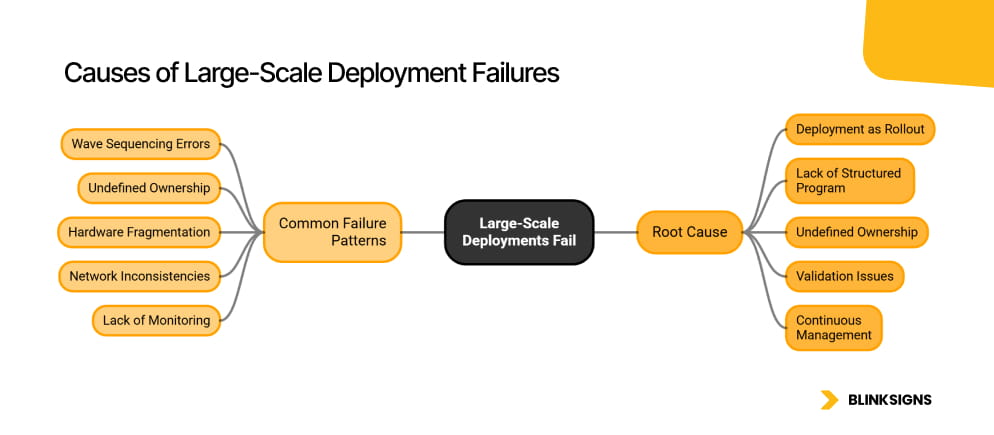
Causes of Large-Scale Deployment Failures
The Enterprise Deployment Program Model™
The Enterprise Deployment Program Model™ defines the seven phases required to execute large-scale deployments successfully. Each phase exists to reduce risk before it compounds at scale.
Phase 1: Audit
The audit phase establishes the factual foundation of the deployment by validating what exists, what is missing, and what must change before a single screen ships.
- Existing infrastructure assessment
- Network readiness validation per site
- System compatibility with CMS and integration targets
Phase 2: Architecture
The architecture phase defines the technical blueprint that ensures the deployment can scale consistently across regions without introducing fragmentation or rework.
- Hardware standardization
- CMS configuration and tenant structure
- Integration readiness validation
Phase 3: Pilot
The pilot phase validates the system under controlled conditions, ensuring that failure modes are identified before they scale across the network.
- 10–50 screen deployment
- Failure scenario testing
- Validation of latency, governance, and monitoring
Phase 4: Wave Planning
Wave planning determines the order and grouping of deployments to minimize risk and prevent compounding issues across locations.
- Deployment sequencing
- Resource allocation
- Regional prioritization
Phase 5: Execution
The execution phase activates screens according to the defined sequence, ensuring infrastructure, governance, and monitoring operate as designed.
- Installation and activation
- Initial monitoring
- Governance enforcement
Phase 6: Stabilization
The stabilization phase ensures that the deployed system performs reliably across all locations under real-world conditions.
- Issue resolution
- Performance tuning
- System validation
Phase 7: Optimization
The optimization phase transforms the deployment into a continuously improving system through performance tracking and operational refinement.
- Continuous improvement
- Content performance tuning
- Operational efficiency
Deployment Velocity: The Core Metric
Deployment Velocity is defined as:
The number of screens that can be reliably activated per week, with governance, content validation, and monitoring in place.
This metric distinguishes between installation speed and operational deployment.
Deployment Velocity Benchmarks
| Deployment Scale | Velocity | Constraint |
| 50–200 | 15–25 screens per week | Installation capacity |
| 200–500 | 30–50 screens per week | Network readiness |
| 500–2,000 | 50–100 screens per week | Governance approvals |
| 2,000–5,000+ | 100–150 screens per week | Regional coordination |
The keyword is reliably. Screens installed without governance, monitoring, or validated content do not count toward deployment velocity.
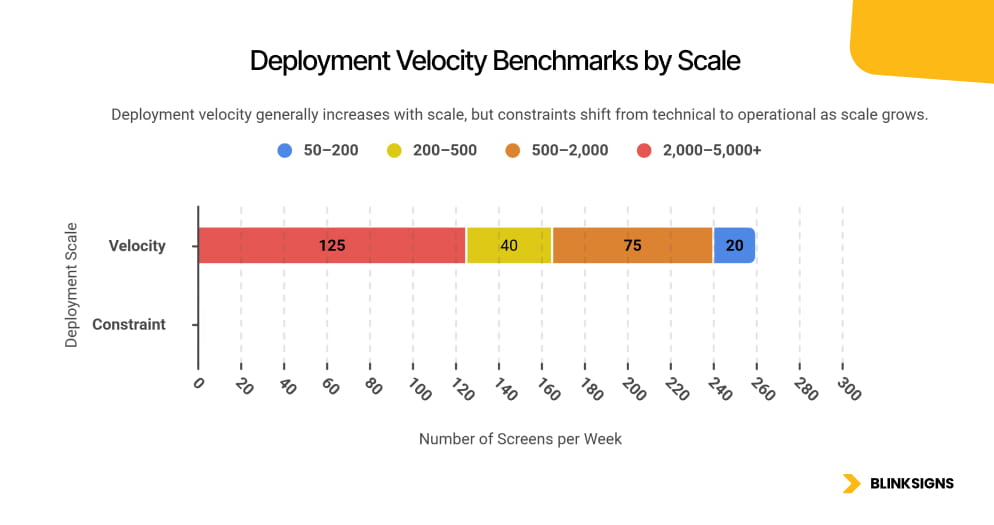
Deployment Velocity Benchmarks by Scale
The Deployment Ownership Model™
Large-scale deployments require clearly defined human accountability across all phases.
| Role | Primary Responsibility | Deployment Phase |
| Global Program Owner | Strategy, budget, vendor governance | All phases |
| Regional Leads | Wave execution, local coordination | Waves |
| IT Infrastructure Team | Network provisioning, hardware staging | Phases 1–3 |
| CMS Administrators | Content systems, permissions, testing | Phases 2–5 |
| Local Champions | Site adoption, first-line support | Phases 4–7 |
| Security and Compliance | Governance, audit readiness | Phases 2 and 5 |
Without a defined ownership model, a deployment has an installation team but no program. Screens go live, but accountability does not exist.
Hardware Standardization as a Deployment Prerequisite
Hardware decisions determine whether a deployment can scale.
Key Principles
- Standardize media players across all locations
- Align display specifications for consistency
- Ensure compatibility with CMS and integrations
Critical Insight
Hardware fragmentation is the primary driver of:
- Support complexity
- CMS incompatibility
- Operational inefficiency
Hardware is not a procurement decision. It is a deployment architecture decision that determines long-term scalability.
The Network Readiness Scorecard
Before deployment begins, each site must be validated against the minimum requirements:
- Bandwidth capacity per screen
- VLAN isolation for network segmentation
- Firewall configuration and port access
- IP management through static allocation or DHCP reservation
Failure to validate network readiness results in:
- playback failures
- synchronization delays
- system instability across locations
Integration as a Deployment Gate
Large-scale deployments must not begin until the integration architecture is finalized.
If deployment begins without integration readiness:
- Systems require reconfiguration later
- Data-driven functionality is limited
- performance is permanently constrained
Key Principle
Integration is not a post-deployment upgrade. It is a prerequisite for deployment.
The Observability Layer for Screen Networks
Large-scale deployments do not fail loudly. They degrade quietly across thousands of endpoints.
An enterprise network with 1,000 to 5,000 screens cannot be operated through manual checks or reactive support. It requires a structured Observability Layer that continuously validates system health, content accuracy, and data integrity.
Core Monitoring Dimensions
| Monitoring Dimension | What Is Tracked | Alert Threshold |
| Device uptime | Online or offline status per screen | Greater than 5 minutes offline |
| Content playback validation | Correct content rendered at the correct time | Any mismatch |
| Network health | Bandwidth, latency, packet loss | Degradation threshold |
| CMS sync status | Last successful content push | Greater than 15 minutes delay |
| API integration health | Data freshness and trigger success | Stale data or failed trigger |
Observability is not a reporting tool. The operational control layer determines whether the system is functioning in real time.
You cannot operate 5,000 screens without centralized observability.
The Post-Deployment Decay Curve™
The most significant risk in large-scale deployments begins after the system goes live.
Typical Decay Pattern
- Weeks 1–4: High engagement, active monitoring, frequent updates
- Months 2–3: Content update frequency decreases
- Months 4–6: Ownership becomes inconsistent across locations
- Month 6 onward: Screens begin showing outdated or irrelevant content
- Year 2: System is treated as installed hardware rather than a managed network
Root Causes of Decay
- Content fatigue due to a lack of structured update cycles
- Ownership gaps at the site and regional levels
- Absence of performance metrics to detect decline early
Prevention Model
Decay is prevented through:
- Continuous observability
- Defined ownership via the Deployment Ownership Model™
- Structured content refresh cycles
- Performance-based optimization
An unmanaged deployment will decay, regardless of how well it was installed.
Content Distribution Architecture at Scale
Content delivery mechanisms determine whether a deployment performs consistently across regions.
Distribution Models
| Model | Best Use Case | Limitation |
| Direct CMS delivery | Fewer than 100 screens | Performance degrades at scale |
| Regional CDN caching | 100–1,000 screens | Requires infrastructure setup |
| Edge caching per site | 1,000–5,000 screens | Higher complexity |
| Hybrid distribution model | Enterprise-scale deployments | Recommended |
Key Metric: Sync Delay
Sync delay is the time between a content update in the CMS and its reflection across all screens in the network.
At scale, unmanaged sync delay results in:
- inconsistent messaging across regions
- outdated content on specific screens
- reduced trust in the system
Sync delay must be actively monitored and controlled within the Observability Layer.
The Deployment Risk Timeline
Failure in large-scale deployments follows predictable patterns across phases.
| Phase | Primary Risk | Failure Trigger | Prevention |
| Pilot | Under-testing | Limited scenarios hide edge cases | Explicit failure testing |
| Wave 1 | Hardware variation | Field conditions differ from the plan | Site validation |
| Waves 2–3 | Governance gaps | Regional overrides misaligned | Early permission locking |
| Expansion | Velocity pressure | Speed prioritized over stability | Enforce velocity thresholds |
| Global scale | Operational overload | Central teams overwhelmed | Regional ownership structure |
| Post-launch | System decay | Ownership breakdown | Local Champion Model™ |
This timeline allows organizations to anticipate and prevent failure before it escalates.
The Local Champion Model™
Technology enables deployment. People sustain it.
Champion Structure
| Champion Tier | Scope | Responsibility |
| Site Champion | Single location | First-line support and feedback |
| Regional Champion | Multi-site | Training, coordination, escalation |
| CMS Administrator | Central system | Governance, permissions, system control |
Activation Rule
Each site must have a trained Site Champion before deployment begins.
Sites without ownership are not deployment-ready, regardless of infrastructure readiness.
Insight
A network without local champions is an installation.
A network with local champions is an operational system.
The Screen Governance Matrix™
Large-scale deployments require structured control with controlled flexibility.
| Screen Type | Governance Level | Content Owner |
| High-visibility | Global control | Global Program Owner |
| Operational | Regional override | Regional Lead |
| Informational | Local flexibility | Site Champion |
| Compliance-critical | Strict global control | Legal and Compliance with Global Owner |
This model aligns governance with ownership and ensures consistency without eliminating regional relevance.
Total Cost of Ownership (TCO) Model
Enterprise deployments must be evaluated across their full lifecycle, not the initial deployment cost.
TCO Breakdown (5-Year View)
| Category | Description | Indicative Range (per screen) |
| Hardware | Displays and media players | $600–$1,200 |
| Software | CMS licensing | $150–$400 |
| Installation | Logistics and configuration | $200–$500 |
| Management | Ongoing operations and support | $400–$900 |
| Refresh cycle | Hardware replacement | $300–$600 |
| Total TCO | Full lifecycle cost | $1,650–$3,600 |
Key Insight
At 500 screens, a $300-per-screen variance in management costs amounts to $150,000 annually.
Total cost of ownership is not optional at enterprise scale. It is the financial foundation of the deployment decision.
ROI and Performance Measurement
Deployment success must be measured beyond installation completion.
Core Performance Metrics
- Deployment velocity adherence
- System uptime consistency
- Content relevance across locations
- Operational efficiency improvements
- Engagement or behavioral response
Measurement Principle
A deployment is successful only if it continues to perform after installation.
Frequently Asked Questions
What is a large-scale digital signage deployment?
A large-scale digital signage deployment is a coordinated program for installing, configuring, and operating hundreds to thousands of screens across multiple locations and regions. It requires the Enterprise Deployment Program Model™, structured governance, infrastructure readiness, and continuous operational management rather than a simple installation approach.
How long does it take to deploy 500 digital signage screens?
Deploying 500 screens typically takes between 12 and 24 weeks, depending on network readiness, installation capacity, governance complexity, and regional coordination. The process includes audit, pilot testing, phased rollout, and stabilization to ensure reliable performance rather than basic activation.
What is Deployment Velocity in digital signage?
Deployment Velocity is the number of screens that can be reliably activated per week with governance, monitoring, and validated content in place. It measures sustainable rollout capacity rather than installation speed and ensures that deployed systems remain operational at scale.
How do you manage content across multi-region screen networks?
Content is managed using structured governance models that define control at global, regional, and local levels. These models ensure consistency across locations while allowing controlled localization through role-based permissions and defined approval workflows.
What is the right hardware strategy for large-scale deployments?
The correct strategy is to standardize on hardware across all locations to ensure compatibility, simplify maintenance, and reduce support complexity. Fragmented hardware environments create inefficiencies and increase long-term operational costs.
What network requirements are needed for 1,000+ screens?
Large-scale deployments require consistent bandwidth per screen, VLAN segmentation, firewall configuration, and reliable connectivity across all sites. Each location must pass a network readiness validation before deployment to ensure stable performance.
What is the Post-Deployment Decay Curve?
The Post-Deployment Decay Curve describes the decline in system effectiveness after launch, driven by reduced content updates, unclear ownership, and insufficient monitoring. Without structured management, deployments gradually lose relevance and operational value.
How do you monitor a large digital signage network?
Monitoring is performed through an Observability Layer that tracks device uptime, content playback accuracy, network health, and data synchronization. Alerts are triggered when thresholds are exceeded, allowing proactive issue resolution.
What is the total cost of ownership for enterprise digital signage?
Total cost of ownership includes hardware, software, installation, ongoing management, and refresh cycles over a multi-year period. Enterprise buyers evaluate lifecycle costs rather than initial deployment expenses to understand the full financial impact.
What causes large-scale digital signage deployments to fail?
Failures occur due to poor sequencing, unclear ownership, hardware fragmentation, network inconsistencies, and insufficient monitoring. The underlying cause is treating deployment as a one-time rollout instead of a structured, ongoing program.
Conclusion
Large-scale digital signage deployments are not installation projects. They are operational systems that require structured programs, defined ownership, and continuous optimization.
Organizations that treat deployment as a program achieve:
- predictable rollout
- stable system performance
- long-term operational value
Organizations that treat deployment as a rollout experience:
- system instability
- governance breakdown
- post-deployment decay
Design Your Deployment Program
If your organization is planning a rollout across hundreds or thousands of screens, the critical question is not how quickly screens can be installed.
The question is whether the system can sustain performance at scale.
Define your deployment program, align ownership across teams, and build a network that continues to perform long after installation.