

Digital Signage Cost Guide: What Affects Hardware, Software, Installation, and Ongoing Budget Planning
Digital signage cost depends on the complete system, not just the screen. A commercial digital signage budget may include display hardware, media players, content management software, content creation, mounting, installation coordination, power access, network readiness, support, maintenance, and ongoing management. The final cost changes based on screen count, use case, indoor or outdoor placement, content workflow, software needs, and whether the project is a simple pilot or a managed multi-location network.
A buyer may start by asking how much a digital sign costs, but that question is only useful after the scope is clear. A simple indoor screen for a small waiting room is not the same project as a restaurant menu board system, a retail campaign display, an office communications network, a healthcare directory, a video wall, an outdoor digital display, or a multi-location screen program.
The most important question for a commercial buyer is not only
How much does a digital sign cost?
The better question is:
Does the quote cover only the screen or software, or the complete digital signage system?
A screen-only purchase may still require a media player, software, mounting, content, setup, network access, support, and maintenance planning. A software-only subscription may still leave the buyer responsible for hardware, installation, content production, troubleshooting, and replacement planning. A managed digital signage program may include more coordination, but the scope should be clearly defined before quotes are compared.
How much does digital signage cost?
Digital signage cost depends on the system scope. A basic indoor pilot, a software-only setup, a restaurant menu board, a retail promotional screen, a video wall, an outdoor display, and a multi-location screen network should not be estimated the same way.
A complete digital signage budget may include:
- Display hardware
- Media players
- Content management software
- Mounts and accessories
- Content creation
- Content updates
- Installation coordination
- Power access
- Network readiness
- Support
- Maintenance planning
- Replacement planning
- Multi-location governance
For commercial planning, the safest answer is this:
Digital signage cost depends on what is included in the quote. Before comparing prices, buyers should confirm whether they are pricing a screen, software, a hardware bundle, a turnkey installation, or a managed signage program.
The cheapest model is not always the safest model. The right model depends on visibility, risk, screen count, internal ownership, content needs, installation conditions, support expectations, and the importance of the screen to the customer or employee experience.
Digital signage cost at a glance
Digital signage budgets are easier to understand when the main cost categories are separated. This table is a planning framework, not a rate card.
| Cost category | What it includes | What buyers should clarify |
| Display hardware | Consumer TV, commercial display, touchscreen, outdoor display, video wall panel | Screen size, brightness, orientation, intended operating hours, warranty, indoor or outdoor use |
| Media player | External player, built-in app, system-on-chip display, playback device | Software compatibility, content format, reliability, remote management, screen count |
| CMS software | Content scheduling, playlists, remote publishing, permissions, monitoring | Screen count, features, users, integrations, analytics, support, enterprise controls |
| Mounting and installation | Wall mount, ceiling mount, display placement, access, cabling coordination | Height, wall type, access, safety, working hours, site restrictions, equipment needs |
| Content creation | Menus, promotions, announcements, templates, motion graphics, brand layouts | Update frequency, number of layouts, animation, video, approvals, localization, accessibility |
| Power and network readiness | Power access, data access, Wi-Fi, Ethernet, device access, and IT review | Existing infrastructure, network reliability, permissions, remote access, and security requirements |
| Support and monitoring | Troubleshooting, software support, screen checks, escalation, and warranty coordination | Screen count, locations, response expectations, internal ownership, support model |
| Maintenance and replacement | Cleaning, replacement planning, warranty handling, lifecycle review | Operating environment, access, hardware age, usage pattern, support availability |
| Multi-location governance | Standards, templates, permissions, approvals, rollout tracking, reporting | Number of sites, local exceptions, brand controls, content ownership, project visibility |
Before comparing quotes, use a digital signage cost breakdown worksheet to organize requirements for hardware, software, content, installation, network, support, and management. This helps buyers compare the same scope rather than one partial quote against another.
Avoid comparing incomplete hardware bundles against turnkey managed networks.
Download the Signage Quote Comparison Worksheet↘
The table helps buyers identify gaps in quotes. It does not replace a project estimate. A reliable estimate requires information on the use case, screen count, locations, display type, content needs, installation conditions, power and network readiness, support expectations, and the ongoing management model.
What is included in a complete digital signage system?
Digital signage is a screen-based communication system used to display scheduled, remote-managed, or location-specific content. A complete system usually includes several connected parts.
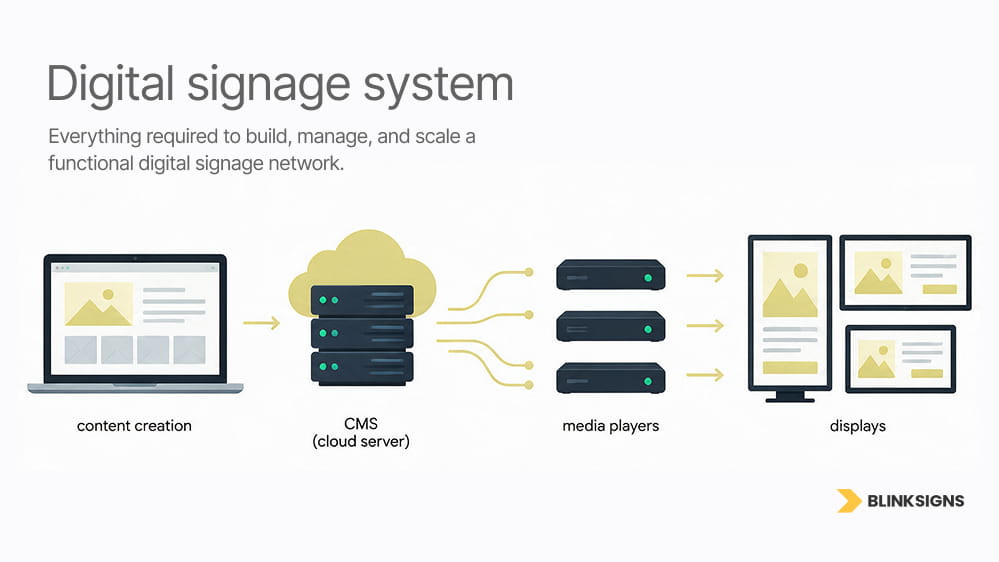
Essential components of digital signage networks.
Display hardware
The display is the visible screen, but screen size alone does not determine suitability. Buyers may need to compare consumer televisions, commercial displays, high-brightness window displays, outdoor-rated displays, touchscreens, direct-view LED displays, or multiple panels assembled as a video wall.
Relevant specifications can include brightness, intended operating hours, portrait or landscape support, warranty terms, heat management, service access, mounting compatibility, and environmental protection.
A television used for a short internal pilot does not have the same operating requirements as a customer-facing display that runs for extended periods. A waiting-room screen does not have the same requirements as an outdoor display, a drive-thru screen, a video wall, or an interactive kiosk.
Buyer takeaway: confirm that the screen is suitable for the environment, operating schedule, orientation, and support expectations.
Media player
A media player receives, stores, or streams content from the content management system and sends it to the display. Some screens include built-in playback, while others require an external device.
The media player decision can affect software compatibility, remote updates, video performance, security review, device replacement, and content reliability. A simple player may be enough for scheduled images or basic announcements. A more demanding project may need stronger playback, interactive capability, multiple content zones, higher video quality, or tighter remote management.
Buyer takeaway: confirm player compatibility, remote management needs, and who will replace or troubleshoot the device if it fails.
Content management system
Digital signage software, often called a CMS, controls what appears on the screen. Depending on the selected platform and plan, it may support playlists, scheduling, templates, content expiration, remote publishing, user permissions, approval workflows, integrations, monitoring, proof-of-play, analytics, and multi-location management.
Software should be compared by capability, not only by monthly cost. A basic plan may be enough for one or two simple screens. A larger organization may need permissions, brand controls, user roles, integrations, monitoring, security review, support, and reporting.
The best software choice depends on the buyer’s screen count, content workflow, hardware, staff capacity, support expectations, and future growth.
Buyer takeaway: Compare software by required capability, not price alone.
Content
Digital signage requires content that is readable, up to date, properly formatted, and useful in the viewing environment. Content may include menus, promotions, service messages, event schedules, directories, wayfinding instructions, safety reminders, dashboards, videos, product education, staff updates, or brand campaigns.
Content is not always a one-time task. Menus change. Promotions expire. Tenants move—schedules update. Seasonal campaigns rotate. Internal messages become outdated. A screen without an owner can quickly become an expensive blank display or an outdated message board.
Buyers should decide who creates content, who approves it, who updates it, how often it changes, and what happens when the responsible person is unavailable.
Buyer takeaway: Assign content ownership before launch.
Mounting, installation, power, and connectivity
A product listing rarely captures the full scope of the field. Digital signage installation can involve mounting surfaces, placement height, display weight, viewing angle, glare, cable routing, access equipment, site protection, working-hour restrictions, power availability, network access, and removal of existing equipment.
Outdoor displays, freestanding structures, electronic message centers, and some wall-mounted systems may also require a permit, electrical, structural, landlord, or site-specific review. Requirements vary by property and location.
This guide does not provide installation, wiring, mounting, network, or electrical instructions. Commercial digital signage should be reviewed based on the site, selected products, property requirements, approved specifications, and qualified professional requirements, where applicable.
Buyer takeaway: Confirm site conditions before budgeting.
Support, maintenance, and replacement planning
The operating model should identify who monitors screens, publishes content, updates software, troubleshoots players, handles network problems, manages warranties, replaces failed equipment, and coordinates support across locations.
Without clear ownership, a screen can remain offline or show expired content because responsibility sits between marketing, IT, facilities, an installer, a software provider, and local staff.
A complete digital signage plan should define support responsibility before the system launches.
Buyer takeaway: define who fixes what after launch.
Why do digital signage prices vary so much
Digital signage prices vary because the term “digital signage” can describe many different scopes.
A quote may represent:
- A screen-only purchase
- A software-only subscription
- A display and media player bundle
- A low-risk indoor pilot
- A restaurant menu board system
- A retail promotional screen
- A lobby or waiting-room display
- An office communications screen
- A digital directory
- A wayfinding display
- A touchscreen kiosk
- A video wall
- An outdoor digital display
- An electronic message center
- A multi-location screen network
- A managed digital signage program
These scopes are not comparable unless the quote details are clear.
A screen-only price may exclude the media player, CMS software, mounting, installation, content creation, network setup, support, renewals, updates, and maintenance. A software-only price may exclude the display, player, mount, setup, content design, IT involvement, troubleshooting, and replacement planning.
The key buyer question is:
What type of digital signage system is being quoted, and what is included?
What counts as digital signage?

Retail mall digital signage driving traffic.
Digital signage is a screen-based system used to display visual information in a business, public, retail, institutional, or internal environment.
Common digital signage categories include:
- Single indoor display
- Lobby screen
- Waiting-room screen
- Restaurant menu board
- Retail promotional screen
- Office communications screen
- Warehouse or operations display
- Digital directory
- Wayfinding display
- Touchscreen kiosk
- Video wall
- Outdoor digital display
- Drive-thru display
- Campus screen network
- Multi-location digital signage network
- Electronic message center
For commercial buyers, the important question is not only whether the sign uses a screen. The better question is what the system needs to do.
Is it a simple screen with scheduled content? Is it a menu board that needs frequent updates? Is it a waiting-room screen with announcements? Is it a retail display that changes by campaign? Is it a directory that needs tenant updates? Is it a video wall with custom content formats? Is it an outdoor display with brightness and weather exposure concerns? Is it a multi-location network that needs central control and local permissions?
Each answer leads to a different cost structure.
Digital signage costs by deployment model
Free or DIY pilot
A DIY pilot may use an existing screen, a compatible media player, and entry-level software. This can be appropriate for one internal communications screen, a small waiting room, a temporary retail test, or an early content experiment.
A pilot still needs a mount, power, connectivity, a content owner, device compatibility, and a support plan. Entry-level software may also have limitations around screen count, storage, applications, branding control, user roles, content scheduling, or technical support.
DIY may be useful for testing, but it should not be assumed suitable for every commercial environment.
Software-only deployment
A software-only purchase may fit an organization that already owns compatible displays and players and has internal resources for installation, content, IT review, monitoring, troubleshooting, and support.
In this model, the CMS subscription represents only one part of total ownership. The buyer remains responsible for hardware suitability, deployment, content production, security, support, maintenance, and replacement planning.
Turnkey project
A turnkey package may combine displays, players, mounts, software, onboarding, content templates, installation, and selected support.
However, “turnkey” is not a standardized list of inclusions. One turnkey quote may include installation and setup. Another may exclude content creation, electrical coordination, network readiness, support, or future updates. Buyers should ask what is included, what is excluded, and what remains their responsibility.
Managed digital signage program
A managed program may be appropriate when displays are customer-facing, operationally important, distributed across locations, governed by brand standards, or difficult to support internally.
The scope may include planning, hardware coordination, software coordination, content workflow, deployment tracking, installation coordination, support routing, maintenance planning, lifecycle management, and multi-location visibility.
This model can be especially useful for franchises, healthcare groups, retail chains, campuses, restaurant groups, and organizations with several locations.
Consumer TV or commercial display?
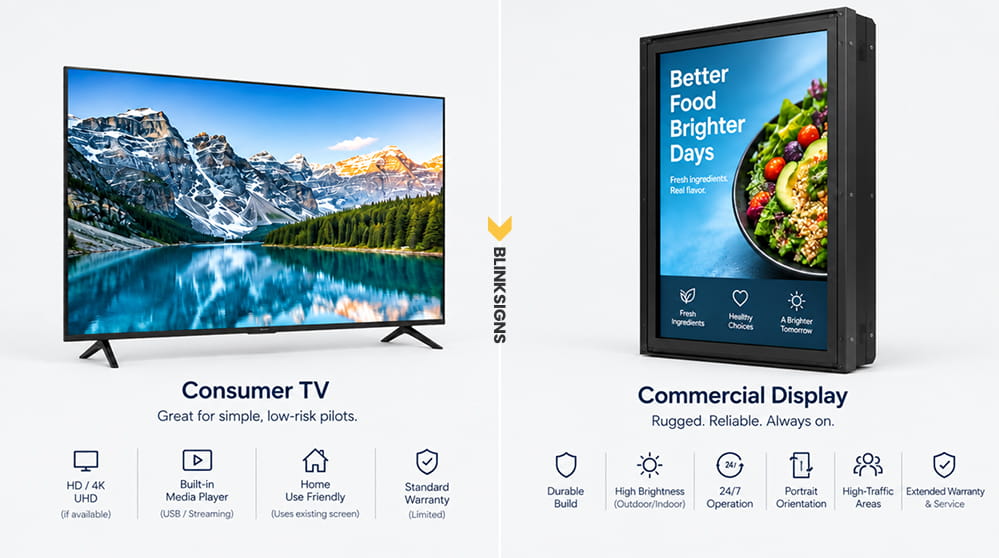
Comparing consumer TVs and commercial displays.
A consumer television may be practical for a small, low-risk pilot, especially when the organization already owns the screen, and the use case is simple.
A commercial display may be more suitable when the screen is customer-facing, used for extended operating hours, installed in portrait orientation, exposed to brighter conditions, placed in a high-traffic area, or expected to meet specific warranty and service requirements.
The decision should be based on the intended environment and manufacturer specifications. “Commercial-grade” should not be treated as a guarantee that every commercial display fits every use case. Buyers should compare the exact model’s operating-hour rating, orientation support, brightness, warranty, connectivity, mounting compatibility, service access, and environmental limitations.
Always check manufacturer documentation for intended use, orientation, operating hours, warranty, mounting compatibility, and environmental limits before selecting a display.
Digital signage costs by business use case
Restaurants, cafes, and hospitality
Restaurants, cafes, quick-service brands, food courts, hotels, and hospitality spaces may use digital signage for menu boards, promotional screens, waiting areas, event messages, order-area content, and branded visuals.
Cost is shaped by the number and arrangement of displays, menu design, daypart scheduling, item changes, content ownership, installation access, and whether locations need centralized or local control.
A single static menu screen is not equivalent to a multi-screen menu system with frequent updates, location-specific availability, or operational integrations. Digital menu boards should be scoped separately from drive-thru systems and outdoor LED displays.
Retail stores and showrooms
Retail stores, showrooms, salons, gyms, and customer-facing service businesses may use digital signage for promotions, product education, brand video, seasonal campaigns, navigation, testimonials, or waiting-area content.
Relevant cost factors include screen placement, brightness, content refresh frequency, campaign production, brand controls, staff ownership, and whether content is managed by each location or centrally.
Digital signage should not be presented as a guaranteed driver of sales or conversions. Its value depends on the use case, audience exposure, content quality, location, operations, and measurement design.
Offices and internal communications
Offices, warehouses, operations teams, and corporate environments may use screens for announcements, schedules, dashboards, visitor information, safety reminders, room information, and employee communications.
The budget can vary based on screen count, software tier, data integrations, security review, user permissions, content workflow, network readiness, and IT support.
Internal displays may be easier to pilot than outdoor or customer-facing systems, but they still require an updated owner and expiration rules for time-sensitive information.
Healthcare and education
Healthcare facilities, schools, campuses, clinics, and training environments may use digital signage for directories, schedules, waiting-area information, general education, wayfinding, emergency messaging, or internal communication.
These projects may require additional attention to privacy, accessibility, security, approvals, and the accuracy of the information displayed. Digital signage should not be used as a substitute for required safety, accessibility, clinical, or emergency communication systems without appropriate review.
Property management and multi-tenant buildings
Property managers, commercial real estate teams, shopping centers, medical buildings, office towers, and campuses may use screens for directories, tenant updates, lobby messages, maps, wayfinding, events, and property announcements.
Cost can depend on tenant data, update frequency, touchscreen functionality, map maintenance, accessibility planning, installation conditions, and approval responsibility.
In a multi-tenant environment, the operational system for maintaining accurate names, suites, maps, and announcements can matter as much as the display.
Franchises and multi-location brands
Multi-location digital signage should be budgeted as a managed screen network rather than a collection of unrelated purchases.
The program may require hardware standards, CMS governance, user permissions, brand templates, content approvals, local exceptions, rollout documentation, monitoring, support routing, maintenance planning, and replacement planning.
A restaurant chain may need approved menu templates with location-level changes. A retail group may schedule regional campaigns. A healthcare network may standardize waiting-room content while allowing clinic-specific information. The cost question, therefore, expands from the price of each screen to the cost and risk of governing the network consistently.
Hidden digital signage costs buyers should check
Digital signage quotes can be difficult to compare because one provider may quote only software, another may quote only the screen, and another may include hardware, installation, content, support, and management.
Before approving a budget, buyers should confirm what is included, what is excluded, and what could change after site review.
| Buyer question | Why it matters |
| Is this a screen-only, software-only, or full-system quote? | Each quote type can include a different portion of the project |
| Is the display suitable for the intended environment? | Brightness, operating hours, orientation, warranty, and exposure may differ |
| Is a media player required? | Some displays include built-in playback, while others need external hardware |
| Is CMS software included? | Software may be separate, bundled, tiered, limited, or enterprise-scoped |
| Are integrations and advanced features included? | Analytics, proof-of-play, feeds, SSO, API access, and interactivity may change scope |
| Who creates, approves, updates, and expires content? | Design support and internal staff time can become recurring operating costs, and outdated content can create confusion |
| Are mounting and installation included? | Height, surface, access, cabling, equipment, and scheduling can change the field scope |
| Are power and network preparation included? | Electrical or data work may require separate qualified providers |
| Who owns support after launch? | Different parties may handle software, hardware, network, and content issues |
| Are maintenance and replacement planned? | Failures, warranties, access, and fleet age affect long-term ownership |
| Is a specialized review required? | Outdoor displays, structures, electrical work, accessibility, privacy, and local rules may add scope |
| Is multi-location governance included? | Standards, approvals, permissions, documentation, and support require program management |
The safest quote comparison question is:
Does this quote cover only one component or the entire digital signage system?
Need help clarifying your digital signage scope? BlinkSigns can help review the use case, screen count, content needs, installation conditions, software requirements, support expectations, and multi-location planning before you compare quotes.
See how screen brightness, outdoor ratings, CMS tiers, and access equipment shift your budget.
Download the Signage Cost Driver Matrix↘
How to budget digital signage in three phases
A phased plan helps buyers avoid overspending too early or scaling a weak setup too quickly.
Phase 1: Pilot and validate
Begin with a limited use case, one or a small number of screens, simple content, and a clearly assigned owner.
A pilot should answer practical questions:
- Can the chosen hardware and software reliably deliver the required content?
- Is the screen readable from the intended viewing position?
- Is the screen placed where the intended audience can actually see it?
- How often does content need to change?
- How much staff time is required?
- Who handles publishing, approvals, and troubleshooting?
- What evidence will determine whether the pilot should expand?
A pilot should test usability and operating fit. It does not automatically prove sales impact.
Phase 2: Single-location rollout
A broader single-site deployment should standardize display specifications, media players, CMS configuration, content templates, placement, installation, network readiness, user permissions, and support.
Before launch, document what happens when content is wrong, a screen goes offline, a player fails, or a software update changes device behavior.
At this stage, the buyer should also decide whether content will be managed by marketing, operations, HR, local staff, a signage partner, or another responsible team.
Phase 3: Multi-location network
A multi-location rollout needs both technical standards and governance.
Budget planning should account for location surveys, approved configurations, brand templates, user roles, local exceptions, deployment tracking, monitoring, escalation, warranties, replacement procedures, and lifecycle planning.
Scaling a weak pilot multiplies its weaknesses. Expand only after the hardware, software, content, support, and measurement model are sufficiently clear.
How to plan digital signage content
Content may include menus, promotions, product information, announcements, safety reminders, schedules, dashboards, directories, wayfinding, videos, social feeds, and seasonal campaigns.
Before deployment, decide:
- Who creates and approves the first content set?
- Who can publish to each screen or location?
- How often will content be reviewed?
- Which messages need automatic expiration dates?
- Can local teams edit templates, or only selected fields?
- Who verifies that menus, tenant information, schedules, and messages are correct?
- What is displayed when a feed, integration, or network connection fails?
- Who removes outdated campaigns?
A screen without a governed content workflow can become an expensive blank display or an outdated message board.
Maintenance and support planning
Digital signage support can include remote monitoring, software updates, player troubleshooting, content publishing assistance, network escalation, warranty administration, display replacement, and coordination with installers or local teams.
Assign responsibility for each layer before launch.
Common ownership areas include:
- Content updates
- CMS access
- Screen monitoring
- Media-player issues
- Network problems
- Display replacement
- Mounting or hardware review
- Warranty claims
- Location-level support
- Multi-location escalation
- Documented escalation paths
The appropriate owner will differ by organization. What matters is that responsibility and escalation are explicit.
A system can fail operationally even when the hardware still works. For example, a screen may display outdated information because no one owns content review. A player may remain offline because IT and the software provider each assume the other side is responsible. A multi-location rollout may become inconsistent because local teams create their own content without brand controls.
Maintenance planning prevents these problems from becoming recurring friction.
Common digital signage budgeting mistakes
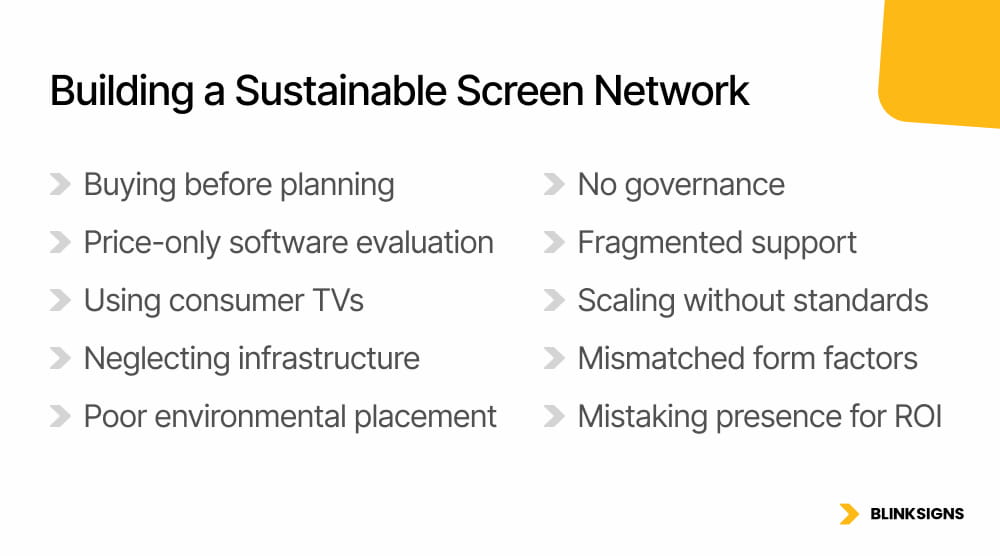
Common mistakes in digital screen budgeting.
Common mistakes include:
- Buying screens before defining the audience, use case, and content
- Comparing software plans only by monthly price
- Assuming every television supports the required orientation or operating schedule
- Forgetting media players, mounts, cabling, power, or network preparation
- Ignoring glare, viewing distance, height, and approach path
- Launching without a content owner or approval workflow
- Failing to expire old promotions, menus, schedules, or tenant information
- Treating support as one responsibility when several providers and internal teams may be involved
- Scaling to multiple locations without hardware, software, content, and permission standards
- Comparing a simple indoor screen with a kiosk, video wall, menu board, outdoor LED display, or electronic message center
- Treating the presence of a screen as proof of marketing or operational return
The best digital signage plan starts with the use case, audience, location, content workflow, support model, and management structure. The screen comes after that.
When does the project require specialized planning?
Some digital signage projects need more specialized scoping because the screen is tied to ordering, interactivity, outdoor visibility, public messaging, or complex installation conditions.
Digital menu board
A digital menu board may require coordinated layouts, daypart scheduling, item updates, operations-friendly templates, content approvals, and integration planning.
Drive-thru systems can involve different displays, enclosures, brightness, access, and environmental requirements from indoor menu boards. Menu boards should be planned as a specialized project when the screen directly supports ordering, pricing, product availability, or operational communication.
Related future guide: Menu Board Cost Guide.
Touchscreen kiosk
A touchscreen kiosk may require interactive experience design, compatible hardware, software integration, security review, accessibility planning, privacy review, content architecture, monitoring, and support.
A kiosk is not simply a digital signage screen with touch enabled. It usually requires more in-depth planning for user actions, system behavior, data handling, and failure states.
Related future guide: Kiosk Signage Cost Guide.
Video wall
A video wall may require multiple matched panels, processors, specialized mounting, alignment, calibration, content formatting, installation access, heat management, and service planning.
Video walls are often more complex than single-screen deployments because the content and hardware must function as a single, coordinated display.
Related future guide: Video Wall Cost Guide.
Outdoor LED display or electronic message center
Outdoor digital displays and electronic message centers may require planning for brightness and viewing distance, pixel-pitch selection, weather-rated components, secure mounting or structures, power, connectivity, permit review where applicable, content controls, and service access.
These specialized systems should not be compared directly with a basic indoor display and entry-level software setup.
How BlinkSigns helps plan digital signage
BlinkSigns helps buyers turn a vague digital signage request into a defined project scope. That includes clarifying whether the project is a single-screen pilot, a menu board system, a retail display, an internal communications network, a video wall, an outdoor display, a kiosk, an electronic message center, or a multi-location program.
Planning can include:
- Use-case clarification
- Screen-count planning
- Display and media-player coordination
- CMS requirement review
- Content workflow planning
- Site and installation condition review
- Power and network readiness discussion
- Permitting support where relevant
- Maintenance planning
- Multi-location coordination
- Project visibility through SignTrax, where applicable
BlinkSigns can also connect digital displays with the broader signage environment, including storefront signs, lobby signs, directories, wayfinding, wall graphics, cabinet signs, monument signs, pylon signs, and exterior LED displays.
This matters because digital signage rarely exists alone. A screen may need to support the same customer journey as physical identification signs, directional signs, window graphics, interior branding, and exterior visibility.
What to prepare before requesting an estimate
A clearer digital signage estimate starts with clearer project information.
Prepare the following, where available:
- Property address and business type
- Intended audience and use case
- Number of screens and locations
- Indoor or outdoor placement
- Photos of proposed screen locations
- Approximate screen sizes
- Customer-facing or internal use
- Expected operating hours
- Content types and update frequency
- CMS or media-player preferences, if any
- Brand guidelines and example content
- Power and network information
- Mounting surfaces and installation height
- Access or scheduling restrictions
- Landlord criteria, if applicable
- Permit status, if relevant
- Security, privacy, accessibility, or IT requirements
- Support and maintenance expectations
- Target launch date
The most useful photos show the full area, mounting surface, likely viewing path, nearby obstructions, lighting or glare, access conditions, and visible power or data points.
Each location in a multi-site program should be documented separately, even when one brand standard governs the rollout.
Download the Digital Signage Quote Prep Checklist
Use the Digital Signage Quote Prep Checklist before requesting an estimate. It can help organize screen count, placement photos, content needs, software preferences, network notes, installation access, support expectations, and multi-location requirements.
The checklist is designed to help buyers prepare for a clearer conversation. It does not replace site-specific review, installation review, network review, software review, content planning, permit review (where applicable), electrical coordination, hardware review, maintenance planning, or a confirmed project quote.
Gather your screen counts, wall types, power access points, and IT constraints before requesting a quote.
Download the Signage Quote Prep Checklist↘
Frequently asked questions
What is the average cost of digital signage?
There is no single reliable average for every digital signage project. Cost depends on screen count, display type, media players, CMS software, content creation, mounting, installation conditions, network readiness, support, maintenance, and the management model.
A single indoor screen, a menu board system, an outdoor display, a video wall, a kiosk, and a multi-location network should be estimated separately.
How much does digital signage software cost?
Digital signage software cost depends on the number of screens, software features, user permissions, storage, content tools, integrations, analytics, monitoring, support, security requirements, billing model, and contract structure.
Some systems use limited entry plans. Others use per-screen subscriptions, feature tiers, bundled hardware and software, or enterprise agreements. Buyers should compare software by required capability, not price alone.
What should be included in a digital signage quote?
A digital signage quote should clarify whether it includes displays, media players, CMS software, mounting, installation coordination, content creation, network readiness, support, maintenance, warranties, replacement planning, user permissions, integrations, and multi-location governance.
It should also state what is excluded, what depends on site review, and who owns each responsibility after launch.
Is free digital signage software available?
Some providers offer free or entry-level software options, often limited to a set number of screens or basic testing. These plans may include restrictions around devices, branding, storage, features, support, apps, scheduling, or upgrade paths.
Free software may be useful for a pilot, but commercial buyers should check whether it supports the intended hardware, content workflow, security expectations, and growth plan.
Can a business install digital signage itself?
A DIY approach may be reasonable for a low-risk indoor pilot when the organization has compatible hardware, suitable mounting, power, connectivity, content resources, and technical ownership.
Customer-facing, elevated, outdoor, interactive, multi-screen, or multi-location systems may require professional planning and qualified installation, as well as electrical, network, or structural support.
Is digital signage profitable?
Digital signage is not automatically profitable. Its value depends on the objective, audience, placement, content quality, operating process, cost, and measurement method.
Before launch, define the intended outcome. Examples may include reducing printed updates, improving information accuracy, shortening menu-change time, supporting navigation, improving internal communication, or supporting a measurable campaign action.
What is the best digital signage provider?
The best-fit provider depends on supported hardware, screen count, content workflow, required applications, user permissions, security, integrations, analytics, support expectations, contract terms, and total ownership model.
A small pilot and a governed multi-location network may require different providers or service models.
Are software subscriptions the main cost?
Not necessarily. Software is a visible recurring line item, but hardware, players, content, mounting, installation, network readiness, support, maintenance, and governance can be equally important.
The dominant cost category depends on the project.
How should multi-location brands budget for digital signage?
Multi-location brands should budget for both the equipment at each location and the network-wide operating system.
This can include hardware standards, CMS permissions, approved templates, content governance, local exceptions, rollout coordination, monitoring, support routing, maintenance planning, and replacement planning.
What is the difference between digital signage and an outdoor LED sign?
Digital signage is a broad category that includes many screen-based systems. An outdoor LED display is a specialized exterior system whose scope may involve pixel pitch, brightness, weather protection, structural conditions, power, permitting, connectivity, and service access.
It should not be priced as though it were a standard indoor screen.
What hidden costs should buyers check before approving digital signage?
Buyers should check whether the quote includes displays, media players, software, mounting, installation, content creation, network readiness, support, maintenance, warranties, replacement planning, user permissions, integrations, and multi-location governance.
They should also confirm who owns each responsibility after launch.
Plan the complete system before comparing prices
Digital signage cost depends on the system around the screen. Hardware, players, software, content, installation, power, connectivity, support, maintenance, and governance all affect the budget.
A basic pilot, a restaurant menu system, an office communications network, an interactive kiosk, a video wall, and an outdoor LED display are different projects and should be estimated separately.
Begin with the use case, audience, location, content workflow, operating requirements, and support model. Then compare quotes using the same scope.
BlinkSigns can help translate a broad request for digital signage into a clearer project plan that accounts for the physical environment, digital system, installation needs, ongoing ownership, and multi-location requirements.